Core Concepts
Six ideas carry the whole tool: the BaseNote, ratios, expressions, dependencies, modules, and the ≈ symbol.
Relative music theory
Musical relationships are ratios. RMT Compose takes that literally: nothing is stored as a pitch, everything is stored as a relationship.
Traditional: A4 is 440 Hz. E5 is 659.25 Hz. The fifth between them is implicit, and slightly out of tune.
Relative: the BaseNote is whatever you say it is. The note above it is base.f * (3/2). The fifth is explicit, and exactly a fifth.
That buys you three things:
- Pure intervals. 3/2 is stored as the fraction 3/2 and evaluated as a fraction. It never becomes 1.5000001.
- One-edit transposition. Change the base frequency; everything defined against it moves, in tune.
- Tunings as arithmetic.
2^(1/12)is a 12-TET semitone.3^(1/13)is a Bohlen-Pierce step. No special mode required.
The BaseNote
Every module has one BaseNote — note id 0, drawn as the orange circle. It makes no sound. It is the origin.
| Property | Shortname | What it is | Code default |
|---|---|---|---|
frequency | f | Reference frequency in Hz | 440 |
startTime | t | Reference start time in seconds | 0 |
tempo | tempo | Beats per minute | 60 |
beatsPerMeasure | bpm | Beats in a measure | 4 |
measureLength | ml | Length of a measure in seconds | derived: 60 / tempo × beatsPerMeasure |
Defaults vs. the default module
The table's right-hand column is what a module gets when it is constructed with no JSON. The default module the app boots with overrides them: frequency 263, startTime 0, tempo 100, beatsPerMeasure 4. That is what a new user actually sees, and it is what the examples on this page use.
The BaseNote has no duration. It is a reference point, not a sounding note — base.d resolves to nothing. When you want a length in terms of the BaseNote's tempo, use beat(base).
Every other note can reference it:
base.f * (3/2)      # a perfect fifth above the base
base.t              # start when the BaseNote starts
beat(base) * 2 # two beats long, at the BaseNote's tempoLegacy JavaScript syntax
module.baseNote.getVariable('frequency').mul(new Fraction(3, 2))
module.baseNote.getVariable('startTime')Think of it as a capo
The BaseNote is a capo. It sets where everything sits; the shapes above it don't change.
Ratios and fractions
Intervals are exact fractions:
| Interval | Ratio | Decimal | Character |
|---|---|---|---|
| Unison | 1/1 | 1.000 | same pitch |
| Octave | 2/1 | 2.000 | same note, higher |
| Perfect fifth | 3/2 | 1.500 | very consonant |
| Perfect fourth | 4/3 | 1.333… | consonant |
| Major third | 5/4 | 1.250 | bright |
| Minor third | 6/5 | 1.200 | dark |
| Major second | 9/8 | 1.125 | whole step |
Why exact fractions?
Compare a fifth in two systems:
| System | Ratio | Decimal |
|---|---|---|
| Just intonation | 3/2 | 1.500000 |
| 12-TET | 2^(7/12) | 1.498307 |
The difference is small and audible. The just fifth locks; the tempered one beats slightly.
RMT Compose stores ratios with fraction.js, so a 3/2 is kept as the numerator/denominator pair 3, 2 — an exact rational — rather than a float. Arithmetic on rationals stays rational and stays exact. (Irrational values, like a TET step, are a separate case; see the ≈ symbol below.)
Expressions
Every note property is an expression: text that compiles to bytecode and evaluates to a value.
Literals
440                 # an integer
(3/2)               # a fraction literal — the parentheses are part of it
0.5 # a decimal, converted to a fraction at compile timeReferences
base.f              # the BaseNote's frequency
[5].t               # note 5's start time
[5].d # note 5's duration[0] is the same thing as base.
Property shortnames
Every property has a short form, and that short form is what the app writes:
| Property | Accepted spellings |
|---|---|
| frequency | f, freq, frequency |
| startTime | t, s, start, startTime |
| duration | d, dur, duration |
| tempo | tempo |
| beatsPerMeasure | bpm, beatsPerMeasure |
| measureLength | ml, measureLength |
Operations
| Operation | Syntax | Example |
|---|---|---|
| Add | + | [3].t + [3].d |
| Subtract | - | [3].t - (1/4) |
| Multiply | * | base.f * (3/2) |
| Divide | / | beat(base) / 2 |
| Power | ^ | 2^(1/12) |
| Negate | - (prefix) | -base.f |
Precedence runs + - loosest, then * /, then unary minus, then ^ tightest. ^ is right-associative, so [1].f * 2^(1/12) means [1].f * (2^(1/12)) — exactly what you want when writing a TET step.
Legacy JavaScript syntax
| Operation | Syntax |
|---|---|
| Add | .add(x) |
| Subtract | .sub(x) |
| Multiply | .mul(x) |
| Divide | .div(x) |
| Power | .pow(x) |
| Negate | .neg() |
Helper functions
There are exactly three, and each takes a bare note reference (base or [N]) — not an expression.
| Call | Meaning |
|---|---|
beat(x) | one beat of x's tempo, in seconds — i.e. 60 / tempo(x) |
tempo(x) | x's tempo |
measure(x) | x's measure length, in seconds |
beat(base) is the idiom for durations. A quarter note is beat(base); a dotted eighth is beat(base) * (3/4); a whole measure is beat(base) * base.bpm.
tempo() and measure() are input sugar
They compile to the same bytecode as x.tempo and x.ml, and that is how they come back when you re-open the note. Only beat() survives a save as-is. Comments (# to end of line) are dropped on save too.
Dependencies
When a note's expression references another note, it creates a dependency.
[1].f * (5/4)       # note 2's frequency: a major third above note 1
[2].t + [2].d # note 3's start time: right after note 2 endsChange note 1, and note 2 and note 3 update automatically. That is the mechanism behind everything: chords are a root plus tones defined against it, progressions are chords defined against the previous chord, scales are chains where each step is defined against the step below.
Seeing dependencies
Select a note and its dependency lines are drawn, coloured by which property the relationship is about:
| Colour | Property |
|---|---|
| Orange | frequency |
| Teal | startTime |
| Purple | duration |
Line weight tells you which way the arrow points: a thick line is something the selected note depends on; a thin line is something that depends on the selected note.
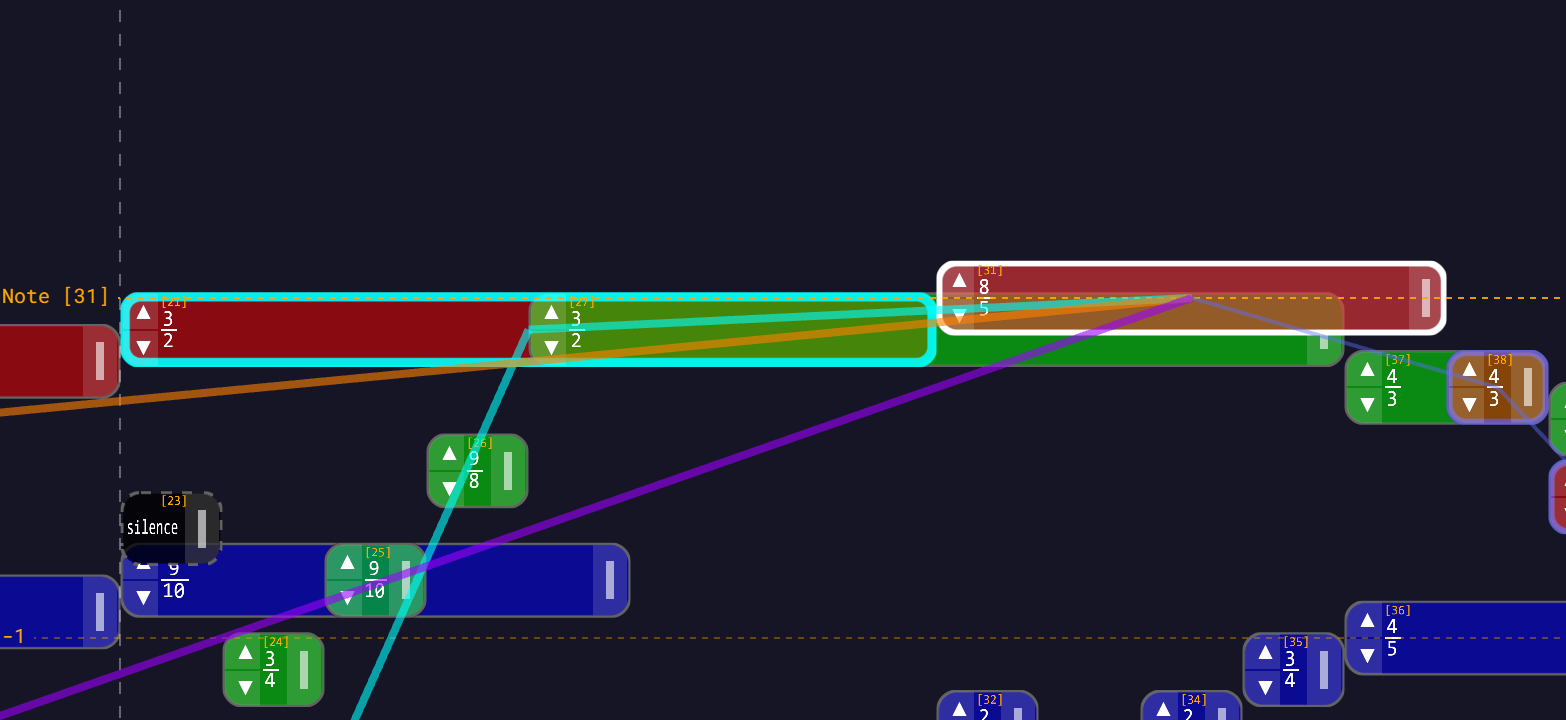
Dependencies covers the graph — retargeting, liberating a note from its parents, and what happens when you drag a note that others depend on.
Circular dependencies are rejected
You cannot make note A depend on note B that depends on note A. Nor can an expression reference its own note.
The app refuses the edit and tells you why: the reason appears in red under the Save button, and the field gets a red border. Fix the expression and save again.
Silences
A note with a start time and a duration but no frequency is a silence. It occupies time and nothing else, and it draws as a dark rectangle with a dashed border. You create one by choosing Silence instead of Note in the Note Widget's ADD NOTE / SILENCE section — the frequency field disappears.
Silences are still full participants in the dependency graph: other notes can hang their start times off a silence's end. See Creating Notes.
Transposition arrows
Selecting a note puts ▲ and ▼ buttons on its frequency row, and draws the same arrows on the note in the workspace. They multiply the note's frequency by a ratio.
That ratio is yours to choose. By default it's the octave — ×2 up, ×1/2 down — but the Arrows tab of Settings lets you set any ratio between 1/16 and 16 (a fifth, a comma, whatever you're working in). In the default reciprocal mode, down is the inverse of up.
The multiplication is folded into the expression's rational coefficient rather than stacked on the front of it. So base.f pressed up becomes 2 * base.f, and pressed back down becomes base.f again — not (1/2) * 2 * base.f. Power terms are never absorbed into the coefficient, so a TET note stays a TET note.
Transposing with Arrows has the details.
Modules
A module is a collection of notes: a whole composition, or a reusable fragment.
Module structure
{
  "baseNote": {
    "frequency": "263",
    "startTime": "0",
    "tempo": "100",
    "beatsPerMeasure": "4"
  },
  "notes": [
    {
      "id": 1,
      "frequency": "base.f",
      "startTime": "base.t",
      "duration": "beat(base) * 2",
      "color": "rgba(255, 100, 100, 0.7)",
      "instrument": "sine-wave"
    },
    {
      "id": 2,
      "frequency": "(5/4) * [1].f",
      "startTime": "[1].t",
      "duration": "beat(base) * 2"
    },
    {
      "id": 3,
      "startTime": "[1].t + [1].d",
      "duration": "beat(base)"
    }
  ]
}Note 2 is a major third above note 1 — defined against note 1, not against the base. Note 3 has no frequency: it is a silence.
Legacy JavaScript syntax (still loads)
{
  "baseNote": {
    "frequency": "new Fraction(263)",
    "startTime": "new Fraction(0)"
  },
  "notes": [
    {
      "id": 1,
      "frequency": "module.baseNote.getVariable('frequency').mul(new Fraction(5, 4))",
      "startTime": "module.baseNote.getVariable('startTime')"
    }
  ]
}Modules are saved in the current syntax. A legacy file loads fine and is rewritten on the next save.
The module library
The module bar under the top bar ships 79 modules in six sections:
| Section | Count | Contents |
|---|---|---|
| Intervals | 46 | Single intervals across the 3-, 5-, 7- and higher-limit families, plus six commas |
| Chords | 11 | Major, minor, dom7, harm7, min7, maj7, dim, aug, sus4, and the RMT-native base-3 and base-5 chords |
| Progressions | 8 | Four progressions (V7–I, ii–V–I, I–IV–V–I, I–vi–IV–V) and four cadences |
| Melodies | 7 | Public-domain tunes: Ode to Joy, Twinkle Twinkle, Frère Jacques, Amazing Grace, Greensleeves, Bach Minuet in G, Scarborough Fair |
| Scale Systems | 6 | 12-TET, 19-TET, 31-TET, Bohlen–Pierce, Tesla, Mixed-Base |
| Custom | 1 | Where your own modules land. Ships with canon base. |
Every module in the library is relational and self-contained — no expression refers to anything outside its own file. That is what lets you drag a module onto any note and have it re-root there: its base.f references become that note's frequency, its base.t references become that note's start time, and the internal structure survives intact. Drop the ii–V–I onto a note a fourth up and you get the same progression, a fourth up.
The Module Library lists every module and how to search them.
Getting your work into the library
- Save Module (the + menu) downloads the whole workspace as
module.json. - Copy to Modules (the group widget, when several notes are selected) saves just that selection into the library's Custom section, rooted at its earliest note.
- A section's dashed + tile uploads a
.jsonfile into that section.
See Saving Modules.
The ≈ symbol (approximation)
Some values display with a leading ≈. That means the value is irrational — it cannot be written as an exact fraction.
When does that happen?
Equal temperament. A 12-TET semitone is:
2^(1/12) # ≈ 1.0594630943...There is no fraction that equals it. RMT Compose calls such a value corrupted — not broken, just no longer exact — and marks it everywhere it appears.
How corruption is shown
- In the note widget, the frequency value is prefixed with ≈ and shown in italic amber — whether the note is corrupted directly or through something it depends on.
- On the canvas, the note is hatched, and the hatch pattern tells you which:
| Hatching | Meaning |
|---|---|
| Crosshatch (both diagonals) | Directly corrupted — this note's own expression contains an irrational power |
| Single diagonal hatch | Transitively corrupted — the note is clean itself, but something it depends on isn't |
Not every ^ corrupts. 4^(1/2) is 2 — a perfect root, so the result is rational and the note stays clean. Only genuinely irrational powers corrupt.
Symbolic simplification
When you save an expression, RMT Compose simplifies it algebraically, and it merges powers of like bases:
2^(1/12) * 2^(1/12) * base.f     ->   2^(1/6) * base.f
2 * (1/2) * base.f               ->   base.f
4^(1/2) * base.f -> 2 * base.fSo two semitones up stays a single exact symbolic step of 2^(1/6), rather than degenerating into a stack of floats. The stored form keeps its algebraic structure; the displayed value is a rational approximation of it, and the ≈ is there to remind you of the difference.
Just intonation vs equal temperament
| Just intonation | Equal temperament | |
|---|---|---|
| Ratios | exact fractions (3/2) | irrational powers (2^(7/12)) |
| Sound | pure, locked | a compromise that works in every key |
| Display | no marking | ≈, and hatching on the note |
Pure Ratios and Equal Temperament go further into both.
Summary
| Concept | In one line |
|---|---|
| BaseNote | Note 0. Silent. The reference every ratio is measured from. |
| Ratio | An exact fraction. 3/2 is a fifth. |
| Expression | The text that defines a property: base.f * (3/2), beat(base), [1].t + [1].d. |
| Dependency | One note referencing another. Change the parent, the child follows. |
| Silence | A note with time but no frequency. |
| Module | A collection of notes. Self-contained, so it can be dropped anywhere. |
| ≈ | This value is irrational. The note is hatched on the canvas. |
Next steps
- Your First Composition — put all six ideas on screen in five minutes
- Expression syntax reference — the complete language
- Dependencies — the graph in detail
- Tutorials — hands-on