Module API
An expression reaches other notes through references and built-in functions. That is the whole surface: three ways to name a note, six properties, three functions.
base.f                 # the BaseNote's frequency
[1].t + [1].d          # note 1's start plus note 1's duration
beat(base) # one beat, in secondsThere is no module object
In the DSL there is nothing called module and nothing to call methods on. The module.getNoteById(…) / module.findTempo(…) spellings on this page belong to the older legacy format; they are kept in collapsed blocks so you can read an old file. The compiled result is identical either way.
Note references
The BaseNote: base
The BaseNote is note 0. It is the module's reference point — the frequency, tempo and meter everything else is measured against. It is not a playable note.
base.f                 # frequency
base.t                 # start time
base.tempo             # tempo, in BPM
base.bpm               # beats per measure
base.ml # measure length, in seconds[0].p means exactly the same thing as base.p, everywhere — including inside a function argument, where beat([0]) is beat(base). Saving rewrites [0] to base.
The BaseNote has no duration
base.d compiles, but the BaseNote does not define a duration and none of the modules that ship with the app give it one. The reference cannot be resolved, so evaluation substitutes the fallback for duration — a flat 1 second, unrelated to the tempo. Nothing on screen says so. If you need a length, use beat(base) or measure(base).
What the BaseNote actually defines:
| Property | Defined on the BaseNote? |
|---|---|
frequency | Yes |
startTime | Yes |
tempo | Yes |
beatsPerMeasure | Yes |
measureLength | Yes (derived from tempo and beatsPerMeasure unless you override it) |
duration | No |
The module that ships as the default puts the BaseNote at 263 Hz, 100 BPM, 4/4. Loading a different module replaces all of that — a module file defines its own BaseNote.
Another note: [N]
[1].f                  # note 1's frequency
[5].t                  # note 5's start time
[10].d # note 10's durationN must be a literal non-negative integer. There is no [prev], no arithmetic in the brackets, and no variables.
Referencing a note that does not exist is not an error. Evaluation substitutes a fixed default and carries on — startTime 0, duration 1, frequency 440, tempo 60, beatsPerMeasure 4, measureLength 4. Nothing on screen tells you this happened, so check the Evaluated: line.
Legacy JavaScript syntax
module.baseNote.getVariable('frequency')          // base.f
module.baseNote.getVariable('tempo')              // base.tempo
module.getNoteById(1).getVariable('frequency')    // [1].f
module.getNoteById(5).getVariable('startTime')    // [5].t
module.getNoteById(10).getVariable('duration') // [10].dProperties
Six properties, each with one or more accepted spellings.
| Property | Accepted spellings | Saved as | Unit |
|---|---|---|---|
| frequency | f, freq, frequency | f | Hz |
| startTime | t, s, start, startTime | t | seconds |
| duration | d, dur, duration | d | seconds |
| tempo | tempo | tempo | BPM |
| beatsPerMeasure | bpm, beatsPerMeasure | bpm | beats |
| measureLength | ml, measureLength | ml | seconds |
Anything else is rejected: there is no l, len, st or pitch.
Inheritance
tempo, beatsPerMeasure and measureLength fall back to the BaseNote when the note you reference does not define them. [5].tempo on a note with no tempo of its own returns the base note's tempo. This is what makes a single tempo change on the BaseNote move the whole piece.
startTime, duration and frequency do not inherit. Each note either has its own expression or it does not.
Built-in functions
Three, each takes exactly one argument, and the argument must be a bare note reference — [N] or base. It cannot be an expression.
tempo(x)
The tempo of x, in BPM.
tempo(base)
tempo([5])tempo(x) compiles to the same bytecode as x.tempo, and is saved as x.tempo. It is input sugar.
measure(x)
The length of one of x's measures, in seconds. Computed as beatsPerMeasure / tempo * 60.
measure(base)                # one measure at the base tempo and meter
[5].t + measure([5]) * 2 # two measures after note 5 startsAt 120 BPM in 4/4: 4 beats ÷ 120 BPM × 60 = 2 seconds per measure.
measure(x) compiles to the same bytecode as x.ml, and is saved as x.ml.
beat(x)
One beat of x, in seconds — 60 / tempo(x).
beat(base)                   # one beat
beat(base) * 2               # two beats (a half note in 4/4)
beat(base) * (1/2)           # half a beat (an eighth note)
beat(base) * (3/2)           # a dotted beat
beat(base) * base.bpm # a full measurebeat() is the one function the decompiler reconstructs, so it is the only one that survives a save. It is also what the note-length buttons in the note widget write for you.
Legacy JavaScript syntax
module.findTempo(module.baseNote)                             // tempo(base)
module.findMeasureLength(module.baseNote)                     // measure(base)
new Fraction(60).div(module.findTempo(module.baseNote)) // beat(base)There is no instrument() function
instrument(note) and module.findInstrument(…) look plausible, but neither parser accepts them — an instrument is not an expression value. See Which instrument a note plays below for what actually decides this.
Dependencies
Referencing another note creates a dependency, automatically:
# Note 2's frequency
[1].f * (3/2) # note 2 now depends on note 1Change note 1's frequency and note 2 re-evaluates. Dependencies are tracked per property, not per note: the expression above records "note 2's frequency depends on note 1's frequency", which is what lets the workspace draw dependency lines in property colours — orange for frequency, teal for startTime, purple for duration.
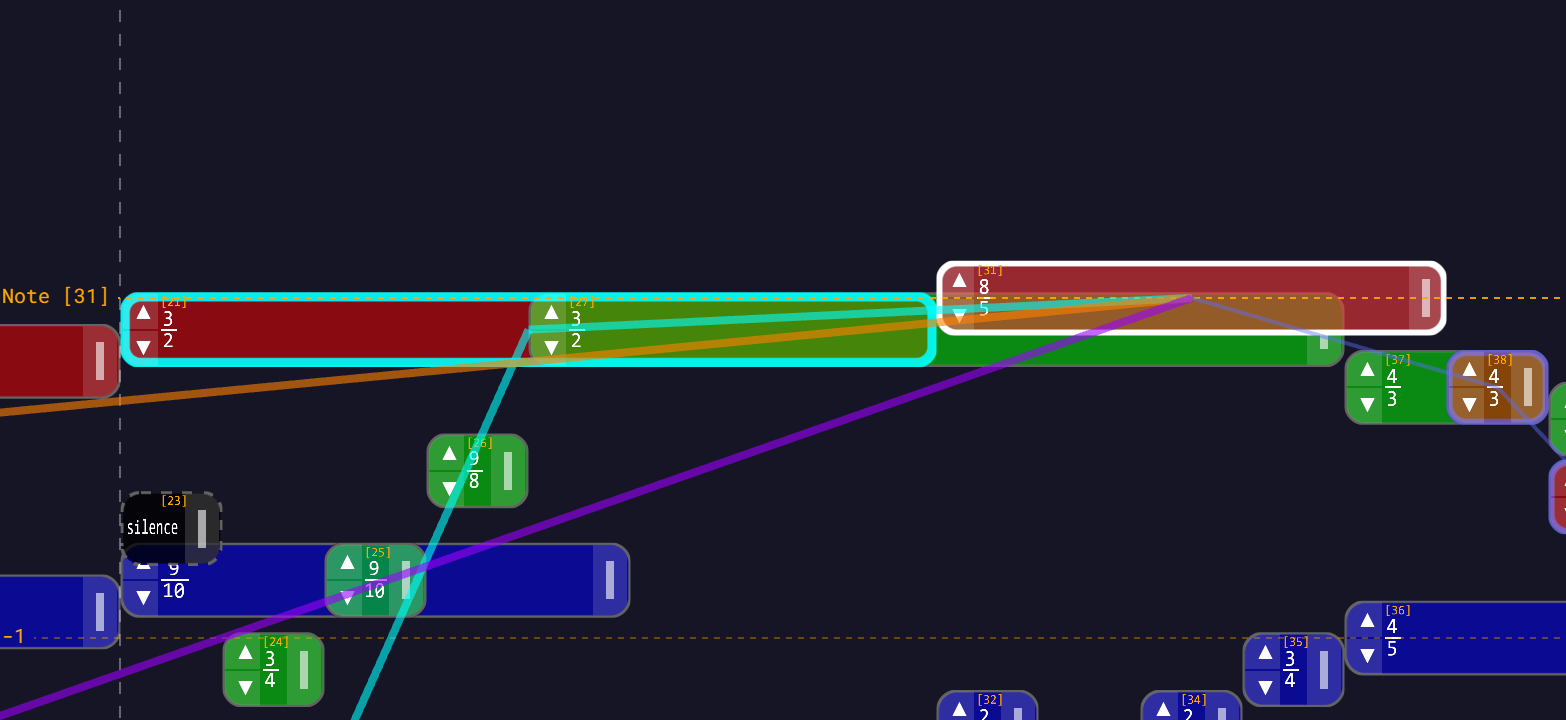
The graph guarantees:
- Dependencies are evaluated before the things that depend on them.
- Circular dependencies are rejected when you save, and self-reference is rejected too.
- Only the notes actually affected by a change are re-evaluated.
Referencing base is tracked differently. It sets a flag on the expression rather than adding a graph edge to note 0 — an edge to note 0 would make the BaseNote depend on itself. The effect is the same (edit the BaseNote and everything referencing it updates), but the BaseNote does not appear as an ordinary parent in the graph.
See Dependencies and Dependency Graph.
Which instrument a note plays
There is no expression for this, but it is worth knowing here because it is the one property that is decided by another property's expression.
A note's instrument is resolved like this:
- If the note has an explicit
instrumentfield, use it. - Otherwise, look at the note's frequency expression. If it references another note (
[N].f) or the BaseNote (base.f), take that note's instrument — recursively. - If nothing along that chain sets one, use the global default instrument (Settings → Audio → default instrument;
sine-waveout of the box).
So instrument follows the frequency chain. Retargeting a note's frequency to a different parent can change what it sounds like. See Instruments.
Worked patterns
Relative frequency
base.f * (3/2)         # a perfect fifth above the BaseNote
[1].f * (5/4)          # a major third above note 1
base.f / 2 # an octave below the BaseNoteSequential notes
[7].t + [7].d # start the instant note 7 endsTempo-relative timing
beat(base)                       # one beat
beat(base) * (1/2)               # half a beat
measure(base)                    # one measure
base.t + beat(base) * (1/4) # a quarter-beat after the BaseNote startsEqual temperament
base.f * 2^(1/12)      # one 12-TET semitone above the BaseNote
base.f * 2^(4/12)      # a 12-TET major third
[1].f * 3^(1/13) # one Bohlen-Pierce step above note 1Legacy JavaScript syntax
// Perfect fifth above the BaseNote
module.baseNote.getVariable('frequency').mul(new Fraction(3, 2))

// Start when note 7 ends
module.getNoteById(7).getVariable('startTime')
  .add(module.getNoteById(7).getVariable('duration'))

// Half a beat
new Fraction(60).div(module.findTempo(module.baseNote)).mul(new Fraction(1, 2))

// 12-TET semitone above the BaseNote
module.baseNote.getVariable('frequency')
.mul(new Fraction(2).pow(new Fraction(1, 12)))See also
- Expression Syntax — the full grammar
- Operators — precedence and result types
- Fraction API — exact numbers, and the legacy surface
- Dependencies — dependency lines in the workspace
- Dependency Graph — how the graph is built