Dependencies
When one note's expression names another note, it depends on it. Change the note it points at and it follows. That is the mechanism behind everything RMT Compose does: a composition is a graph, not a list.
# Note 2's frequency depends on Note 1's frequency
[1].f * (5/4)Note 2 depends on note 1. Note 1 has a dependent: note 2. Move note 1's pitch and note 2 keeps its major third.
Reading the highlights
Select a note and the workspace draws its neighbourhood, colour-coded by the property involved:
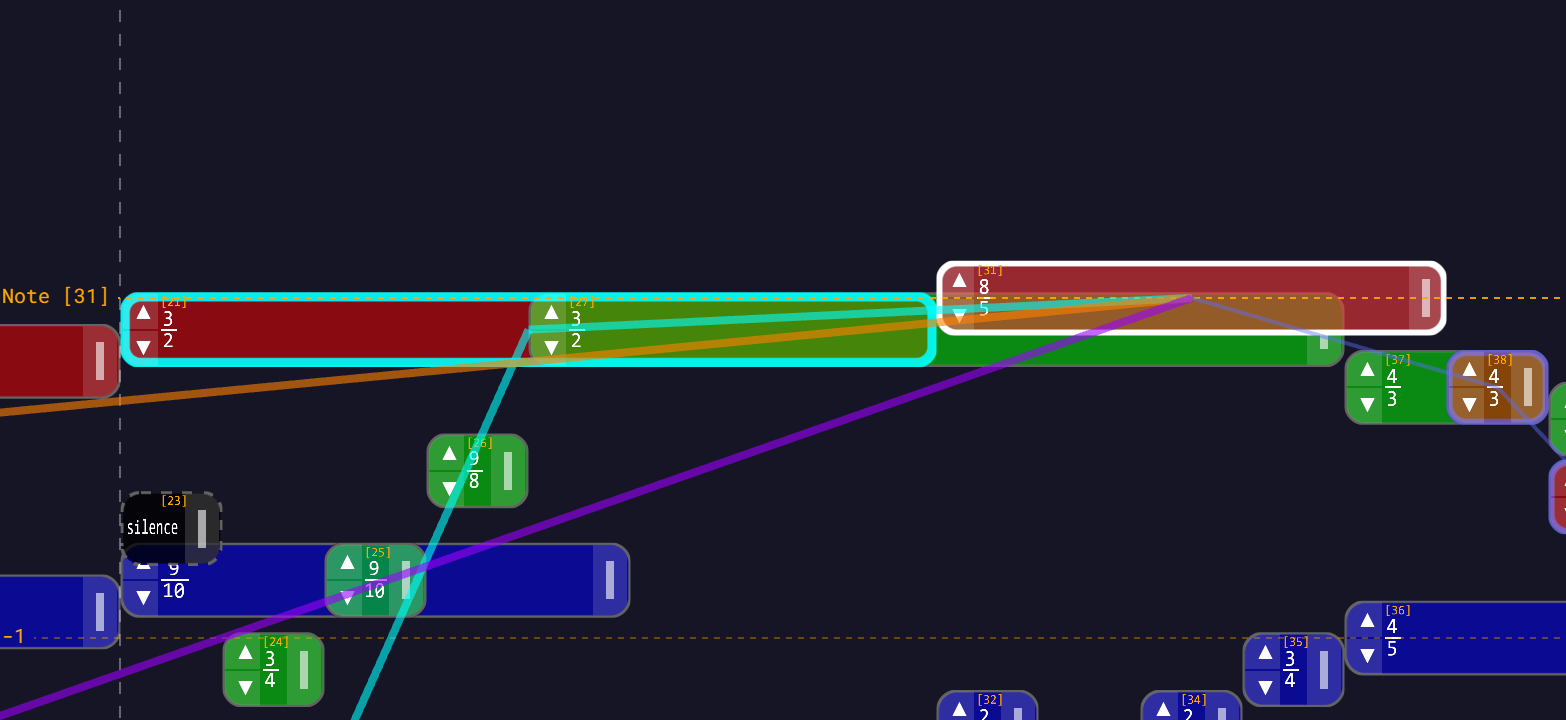
| Colour | Property |
|---|---|
| Orange | frequency |
| Teal | start time |
| Purple | duration |
(Those are the default theme's colours — the three Dependency highlights pickers in Settings → Appearance set them.)
And thickness tells you which way the arrow points:
| Weight | Meaning |
|---|---|
| Thick line | a note the selected note depends on — its parents, traced all the way back to the BaseNote |
| Thin line | a note that depends on the selected note — its dependents |
The notes at both ends also get a coloured ring in the same scheme, thicker on the notes you depend on. In practice the rings are most of what you see; the lines tell you which note is connected to which.
So if you select note 3 and see a thick orange line running back to note 1, note 3's frequency is derived from note 1. A thin teal line out to note 5 means note 5's start time is anchored to note 3 — lengthen or move note 3 and note 5 will shift.
While you drag
The highlights sharpen to show you what the gesture will actually affect:
- Dragging a note: the teal start-time relationships stay bright and the orange and purple ones fade out — because moving a note changes only what is anchored to its timing.
- Resizing a note: the purple duration relationships stay bright and the others fade.
The graph
Dependencies are tracked per property, not per note. Note 4 can take its pitch from note 1 and its timing from note 3 without those two knowing about each other. This is why the app can be precise about consequences:
- Drag previews only move the notes whose start time traces back to the note in your hand.
- Cascade updates only recompute the notes that are actually downstream of what changed.
When a value changes, every note that depends on it — directly or transitively — is marked stale and recomputed in topological order, so a note is never evaluated before the notes it is built from.
BaseNote  (frequency 263)
    └── Note 1   base.f * (3/2)   = 394.5
          └── Note 2   [1].f * (5/4)   = 493.125
└── Note 3 [2].f * (3/2) = 739.6875Retune the BaseNote to 220 and all three follow, keeping their intervals exactly. One edit, whole piece transposed.
The BaseNote
The BaseNote (ID 0) is the root. It depends on nothing, and nearly everything depends on it — directly, or by way of a chain. It carries the properties the rest of the module reads: frequency, startTime, tempo, beatsPerMeasure and measureLength.
base.f and [0].f are the same reference.
Measure chains
Measure bars are notes too — a measure is a note with a startTime and nothing else. They form their own chain, each measure hanging off the previous one:
# Measure 1
base.t

# Measure 2
[1].t + measure([1])

# Measure 3
[2].t + measure([2])Change the BaseNote's tempo or beats-per-measure and the whole bar grid re-lays itself, because every measure's start time is expressed in terms of the one before it. measure(x) is the measure length of x, in seconds. (The widget redisplays it as [1].ml — see Expressions.)
Instruments ride the frequency edge
A surprising consequence of the graph: instruments are inherited along the frequency reference. A note with no instrument of its own plays with the instrument of the note its frequency points at, recursively up the chain, until something sets one or the chain reaches the BaseNote — at which point the global default from Settings → Audio applies.
Set note 1 to violin, and every note whose frequency reads [1].f * … becomes a violin. Repoint a note's frequency at a different parent and its instrument may change with it. See Instruments.
Reshaping the graph
Evaluate to BaseNote
Collapses a note's chain so it references only the BaseNote. The note keeps its exact pitch, position and length; it just stops caring about the notes in between.
Given this chain:
# Note 1
base.f * (3/2)

# Note 2
[1].f * (5/4)

# Note 3
[2].f * (3/2)Selecting note 3 and clicking Evaluate to BaseNote rewrites it as:
base.f * (45/16)because 3/2 × 5/4 × 3/2 = 45/16. Note 3 now transposes with the BaseNote but no longer follows notes 1 and 2.
The conversion traces the chain algebraically, so a TET note stays a TET note — base.f * 2^(7/12) does not degrade into a decimal approximation.
Evaluate Module, on the BaseNote, does this to every note at once. Useful for flattening a module before you share it.
Liberate Dependencies
The inverse operation: instead of freeing this note from its parents, it frees everyone else from this note. Every note that referenced it has the reference replaced by what this note itself referenced. The note survives, but nothing depends on it any more.
Note 3's frequency is [2].f * (5/4), and note 2's frequency is base.f * (3/2). Liberate note 2, and note 3 becomes:
base.f * (3/2) * (5/4)Note 3 sounds exactly the same, but note 2 has dropped out of its lineage. You can now retune or move note 2 freely without disturbing note 3.
Use it when you want to break a note out of the middle of a chain while keeping the chain's behaviour intact. Liberate Dependencies is not available on measure bars.
Delete with Keep Dependencies
Keep Dependencies performs exactly the same substitution and then removes the note. Its dependents keep their positions, lengths and pitches; they simply now reference whatever the deleted note referenced. A direct dependent with no instrument of its own also inherits the deleted note's instrument, so the sound doesn't change either.
Delete Dependencies, by contrast, removes the note and everything downstream of it. Look at the thin lines before you use it.
Deleting a group
Deleting a multi-selection liberates rather than cascades. Every dependent that lies outside the selection is liberated — the deleted notes' expressions are inlined into it, so it keeps its exact position, length and pitch. Only what you selected is destroyed.
The confirmation dialog describes the delete as irreversible. It isn't: it lands as one undo entry. See Selecting Notes.
Two edges the graph will not accept
The graph must stay acyclic, so a note cannot reference itself and two notes cannot reference each other. Both are rejected on Save, with the reason shown in red under the Save button.
A reference to a note that does not exist is a different problem: it produces no edge, no line and no warning, and the evaluator quietly substitutes 440 Hz. Both cases are worked through in Expressions → Things that go wrong.
Patterns
Sequential melody — each note starts when the previous one ends. Lengthen any note and everything after it slides along.
[1].t + [1].d
[2].t + [2].d
[3].t + [3].dChord stack — all the tones share the root's start time and take their pitch from it. Move the root and the chord moves; retune the root and it transposes as a unit.
# start time on every chord tone
[1].t

# frequencies
[1].f * (5/4)
[1].f * (3/2)Transposable phrase — pin one note to the BaseNote and hang the rest off that note rather than off the base. Now you have a single handle for the phrase's pitch, independent of the piece's.
# Note 1: the phrase's root
base.f * (9/8)

# The rest of the phrase, relative to it
[1].f * (5/4)
[1].f * (3/2)Practical advice
- Select before you delete. The lines tell you what is downstream.
- Reference the BaseNote for things that should transpose with the piece; reference a neighbouring note for things that should hold an interval or a rhythm against it.
- Liberate before deleting when you want the dependents to stay put — or just use
Keep Dependencies, which does it for you. - Evaluate to BaseNote when a chain has become hard to reason about and you no longer need it.
Where to go next
- Expressions — the syntax that creates dependencies.
- Editing Notes — where the Liberate, Evaluate and Delete buttons live.
- The Note Widget — the panel itself.