Audio Graph
AudioGraph (src/player/audio-graph.js, 256 lines) owns every node downstream of a per-note voice, and it is the only class that turns an audio.* setting into an audio node. Reverb, stereo spread, the limiter and master volume all reach the speakers through this class — live, without restarting playback.
Two audio.* keys are read outside it as well, and neither builds a node: player.js mirrors audio.masterVolume onto the transport slider and feeds it back through audioEngine.setVolume() (player.js:1143-1170), and it hands audio.defaultInstrument to module.js (player.js:1176-1189).
It is constructed once, by AudioEngine's constructor (audio-engine.js:28), and reachable as audioEngine.graph.
The node chain
per note:  voice ──► voiceGain (ADSR; gain.value starts at 0) ──► [StereoPanner]* ──┐
                                                                                    ▼
                                                        instrumentBus (GainNode, unity)
                                                                   │
                                       dry (always unity) ─────────┼─────────────────┐
                                                                   │                 │
                                       send (1 when reverb on,     ▼                 │
                                             0 when off)  ──► reverbInput             │
                                                                   │                 │
                                             preDelay (DelayNode, max 0.5 s)         │
                                                                   │                 │
                                             Convolver (algorithmic IR, normalize)   │
                                                                   │                 │
                                             reverbReturn (gain = audio.reverb.wet)  │
                                                                   └─────────────────┤
                                                                                     ▼
                                                                               masterGain
                                                                                     │
                                                                [limiter: DynamicsCompressor]*
                                                                                     │
ctx.destination* = present only when the corresponding setting is on.
The per-note segment (voice → voiceGain → panner) is built by AudioEngine._scheduleNote. This class exposes getBus(name) as the connection point.
Reverb is a send, not a crossfade
The dry path is always at unity. Reverb is added on top of it, so audio.reverb.wet is "how much reverb is mixed in", never "how much dry is removed". Turning reverb off ramps the send and return to zero; the dry signal never moves.
Per-instrument buses
const bus = graph.getBus('piano'); // GainNodegetBus(name) (:118) lazily creates one { bus, send } pair per instrument and caches it. The bus connects to masterGain (dry, unity) and to a send gain, which connects to reverbInput. A new send is created at the current reverb state: 1 if reverb is on, 0 if off.
The map key is String(name).toLowerCase() — instrument names are case-insensitive here.
The buses are not a mixer
Every send is fixed at unity, and every bus is fixed at unity. There is no per-instrument volume, no per-instrument send amount, no mute, no solo, and no UI of any kind pointing at these buses. They exist so that a future mixer has somewhere to attach, and because sharing one send per instrument is cheaper than one per voice. Do not describe them as a mixing desk.
The limiter
_configureLimiter() (:88) sets a DynamicsCompressorNode up as a peak catcher:
| Param | Value |
|---|---|
threshold | −6 dB |
knee | 6 |
ratio | 12 |
attack | 0.003 s |
release | 0.25 s |
Default ON (audio.limiter.enabled, settings-schema.js:83).
These are not the old numbers
Earlier documentation described a compressor at threshold −24 / knee 30 / ratio 12. That was accidental heavy compression, and it is gone. If you are copying values from an old page, stop.
_connectMasterChain() (:100) wires masterGain → [limiter] → destination, honouring the enable flag. Toggling the setting disconnects and reconnects the chain — and _onSettings only calls it when the flag actually changed (:181-185), because the reconnect itself is a topology change on a live graph.
Pitch-driven stereo pan
graph.panPosition(freq, baseF); // → clamp(log2(freq / baseF) / 3, -1, 1)panPosition() (:138) returns a normalized position in [-1, 1]. Three octaves span full left-to-right: three octaves above the BaseNote is hard right, three below is hard left, and the BaseNote itself is dead centre. It returns 0 if either frequency is non-positive.
Width is not applied here. The caller multiplies by graph.stereoWidth (audio-engine.js:506). The split is deliberate: panPos is baked once, at preparePlayback time, while the enable flag and width are read when the voice is scheduled.
Stereo defaults OFF (audio.stereo.enabled, settings-schema.js:80). Out of the box, playback is centred.
Master volume
graph.setMasterVolume(0.5);setMasterVolume() (:145) clamps to [0, 1]. If the context is not running it sets .value directly; otherwise it snapshots, anchors and ramps over 50 ms:
const cur = g.value;
g.cancelScheduledValues(now);
g.setValueAtTime(cur, now);      // the anchor — load-bearing
g.linearRampToValueAtTime(v, now + 0.05);The anchor is not optional. cancelScheduledValues alone does not hold the current value, so a bare ramp interpolates from the last surviving (past) event and jumps on the second and subsequent changes — the zipper. Same lesson as the voice fades.
Settings
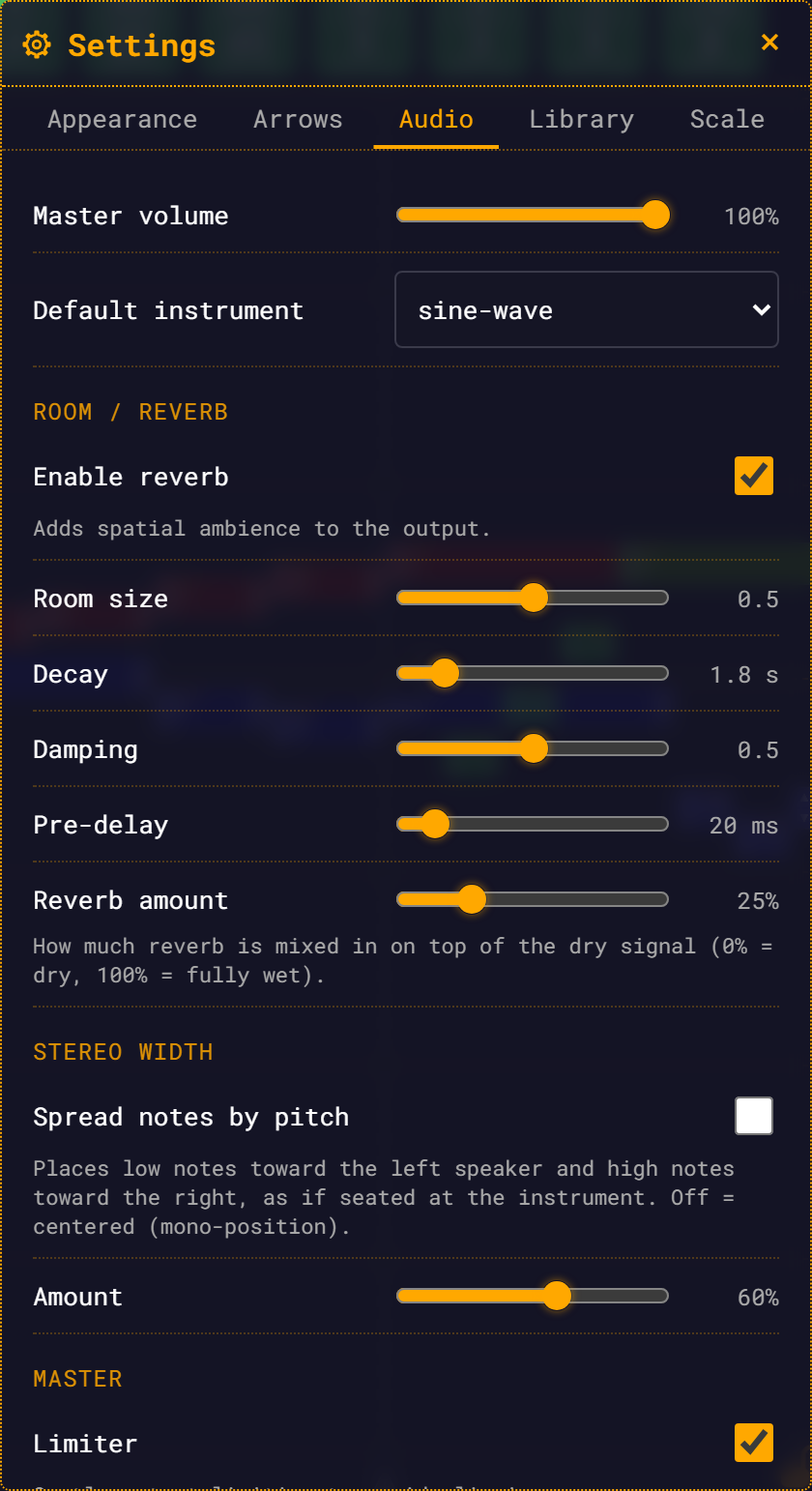
AudioGraph subscribes directly to settingsStore.subscribe(fn) (:83) — not to the eventBus — and handles everything in _onSettings({ path, settings }) (:169). It ignores any path that does not start with audio (a bare '' path is a full reset and is handled).
| Setting | Default | What it touches | Latency |
|---|---|---|---|
audio.masterVolume | 1 | masterGain.gain | 50 ms linear ramp |
audio.defaultInstrument | sine-wave | (not this class — see Instruments) | next playback |
audio.reverb.enabled | true | every bus's send.gain + reverbReturn.gain | ~20 ms smoothing |
audio.reverb.wet | 0.25 | reverbReturn.gain | ~20 ms smoothing |
audio.reverb.preDelayMs | 20 | preDelay.delayTime | ~20 ms smoothing |
audio.reverb.roomSize | 0.5 | IR re-render | 250 ms debounce + offline render |
audio.reverb.decaySec | 1.8 | IR re-render | 250 ms debounce + offline render |
audio.reverb.damping | 0.5 | IR re-render | 250 ms debounce + offline render |
audio.stereo.enabled | false | graph.stereoEnabled | next scheduled voice (up to 2 s) |
audio.stereo.width | 0.6 | graph.stereoWidth | next scheduled voice (up to 2 s) |
audio.limiter.enabled | true | chain reconnect, on change only | immediate |
Live params are smoothed with setTargetAtTime(target, now, 0.02) — a 20 ms time constant — so toggling reverb or dragging the wet slider mid-playback is click-free, and notes already sounding keep their tail.
Stereo changes are not instant during playback
panPos is baked at preparePlayback time, and stereoEnabled / stereoWidth are read when a voice is scheduled — up to LOOKAHEAD (2 s) ahead of the playhead. Toggling stereo mid-playback therefore affects only not-yet-scheduled notes. It is audible after a short delay, not instantly.
Which reverb params force a re-render
Only three: roomSize, decaySec, damping. irKey(rv) (:241) joins exactly those into a string, and _onSettings compares it against the last one. If it changed, _scheduleRegen() debounces by 250 ms (REGEN_DEBOUNCE_MS, :33), so dragging a slider renders once at the end of the drag rather than once per pixel.
_regenIR() (:218) is token-guarded:
const token = ++this._irToken;
const ir = await generateImpulseResponse(this.ctx, { roomSize, decaySec, damping });
if (token === this._irToken) this.convolver.buffer = ir; // stale renders are discardedAn offline render started before a newer change can still finish after it. Without the token, the older IR would win the race and swap in last. Pre-delay and wet are live node params and never trigger a render.
See Reverb for what the renderer actually builds.
Construction order
new AudioGraph(ctx) (:36) reads settingsStore.get('audio') once, then:
- Creates
masterGainseeded from the persistedaudio.masterVolume— so the level you left is restored at boot regardless of any UI. - Creates and configures the limiter, and connects the master chain.
- Builds the reverb send/return (
reverbInput → preDelay → convolver → reverbReturn → masterGain), withconvolver.normalize = true. - Generates an impulse response up front, even when reverb is off (
:73). The offline render works while the context is suspended, so the first time a user enables reverb it is instant and pop-free. - Reads the stereo flags.
- Subscribes to the settings store.
Per-instrument buses are not created here — they appear lazily, on the first note of each instrument.
dispose()
dispose() (:234) unsubscribes from the store and clears the pending regen timer. Nothing calls it. The singleton graph lives for the page's lifetime, and its persistence is what lets reverb tails and note releases ring across a loop seam. It exists to keep the class self-contained.
See also
- Reverb — how the impulse response is synthesised
- Audio Engine — what connects into
getBus() - Instruments — the voices upstream of the buses
- Settings — the Audio tab, from the user's side