Theming
A theme in RMT Compose is a flat map of 16 colour tokens plus three note-geometry numbers. The theme manager resolves the active theme from three layers, then projects it into two completely different targets: CSS custom properties for every piece of DOM chrome, and the WebGL renderer for the canvas.
This page is the developer view. For what the controls do, see Themes & Appearance and the Settings reference.
The pieces
| File | Role |
|---|---|
src/theme/presets.js | Pure data. Four presets, THEME_PRESETS, DEFAULT_THEME_ID, getPreset(id). No DOM or GL imports, so it is safe to import from anywhere. |
src/theme/theme-manager.js | The themeManager singleton. Resolves, writes CSS vars, calls the renderer. |
src/settings/settings-schema.js | defaultSettings() / validateSettings() — the source of truth for appearance defaults and clamps. |
src/settings/settings-store.js | Persistence to localStorage["rmt:settings:v1"], dot-path get/set, subscriptions. |
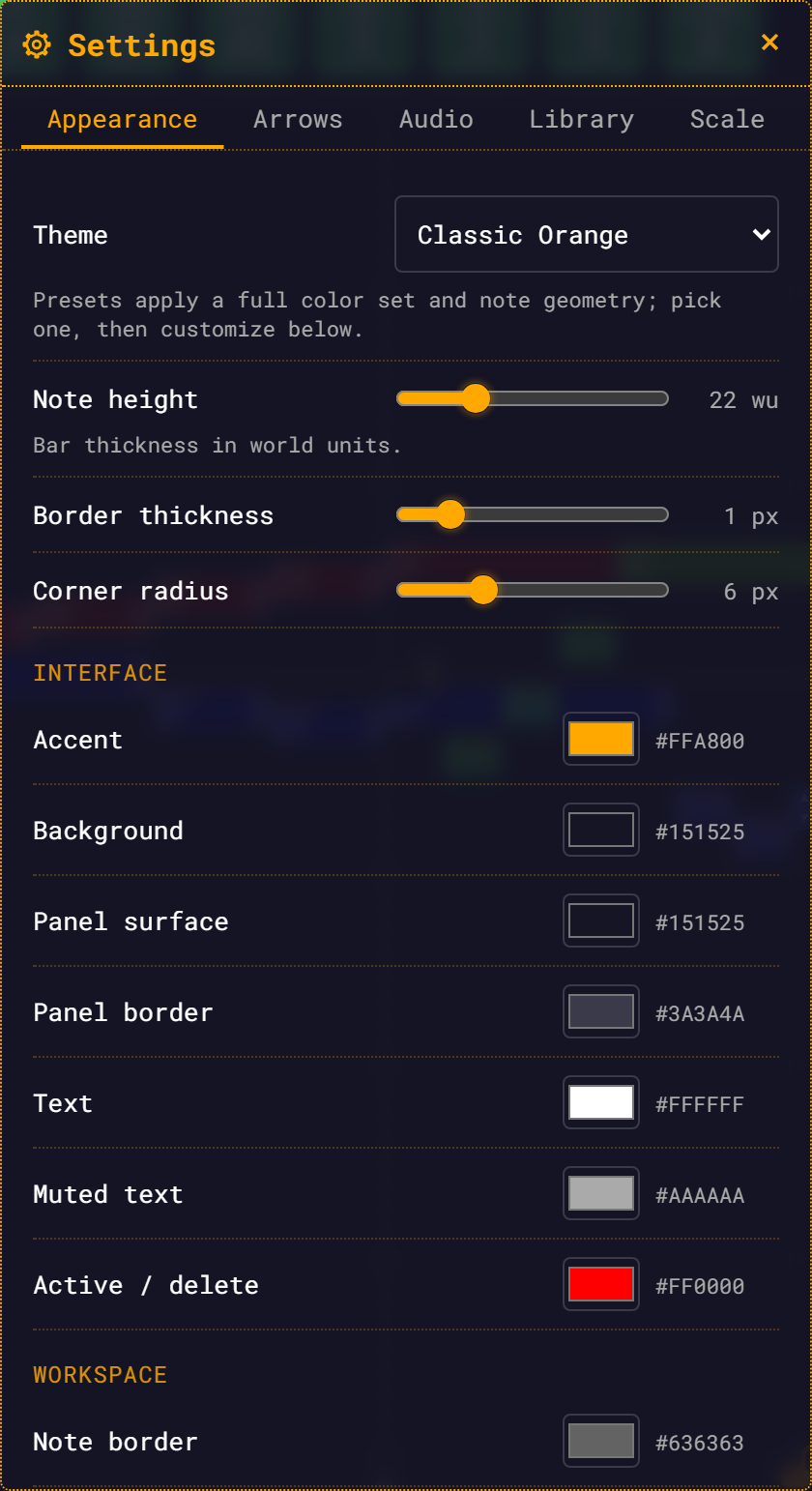
src/settings/settings-panel.js | The Appearance tab, including COLOR_TOKEN_GROUPS — the 15 pickers. |
src/renderer/webgl2/renderer.js | setConfig(), setThemeColors(), and every draw call that reads a themed colour. |
src/renderer/webgl2/renderer-config.js | defaultRendererConfig + normalizeRendererConfig() deep-merge. |
public/styles.css | The :root { --rmt-* } literal defaults, and every DOM rule that consumes them. |
player.js wires it up once the GL workspace exists:
themeManager.init({ renderer, requestResync: () => { /* glWorkspace.sync(...) + createMeasureBars() */ } });init() applies the theme immediately, then subscribes to settingsStore and re-applies on any change whose path is '', 'appearance', or starts with 'appearance'.
The token schema
A ThemePreset is { id, name, tokens, geometry } (presets.js:20).
Colour tokens (all #rrggbb strings):
| Group | Tokens |
|---|---|
| Interface | accent, accentText, bg, surface, surfaceBorder, textPrimary, textSecondary, danger |
| Workspace | noteBorder, playhead, measureBar, selectionRing, hoverRing |
| Dependency highlights | depFrequency, depStartTime, depDuration |
Non-colour tokens, present in every preset: noteDefaultSaturation (a number) and newNoteColorMode ('random' in all four presets).
noteDefaultSaturation is consumed: the theme manager publishes it as the CSS var --rmt-note-default-saturation, and note-creation.js reads it back as the saturation a new note's random hsla(<random 0–360>, <sat>%, 60%, 0.7) colour is born with. newNoteColorMode is still read by nothing — there is no "new note colour mode" setting anywhere in the UI. Note body colours remain per-note user data, not theme data.
Geometry:
geometry: { noteHeightWU: 22, borderPxAtZoom1: 1, roundedCornerPxAtZoom1: 6 }Resolution: preset ∪ overrides ∪ geometry
themeManager.resolve() (theme-manager.js:101) returns { id, tokens, geometry }:
const appearance = settingsStore.get('appearance') || {};
const preset = getPreset(appearance.themeId);            // unknown id → classic-orange
const tokens = { ...preset.tokens, ...(appearance.overrides || {}) };

const noteCfg = appearance.note || {};
const geometry = {
  noteHeightWU:           noteCfg.heightWU               ?? preset.geometry.noteHeightWU,
  borderPxAtZoom1:        noteCfg.borderPxAtZoom1        ?? preset.geometry.borderPxAtZoom1,
  roundedCornerPxAtZoom1: noteCfg.roundedCornerPxAtZoom1 ?? preset.geometry.roundedCornerPxAtZoom1,
};appearance.overrides is a sparse diff — only the tokens the user actually touched. That is exactly why the preset dropdown clears overrides before writing the new themeId (settings-panel.js:258-263): layering an old override map over a new preset would show a mixture.
The stored shape:
{
  "version": 1,
  "appearance": {
    "themeId": "classic-orange",
    "overrides": { "accent": "#ff00aa" },
    "note": { "heightWU": 22, "borderPxAtZoom1": 1, "roundedCornerPxAtZoom1": 6 }
  }
}The geometry ?? fallback in resolve() never fires — the panel applies preset geometry instead.
validateSettings() always fills appearance.note.* with a clamped number (defaults 22 / 1 / 6), so those three values are never null/undefined and the ?? branches above are technically dead. Preset geometry reaches the canvas by a different route: selecting a preset in the Appearance tab writes preset.geometry into appearance.note (settings-panel.js:264-270), re-seeding the sliders — switching to high-contrast lands its declared borderPxAtZoom1: 2, roundedCornerPxAtZoom1: 4. The sliders remain the fine-tuning control afterwards.
Overrides are not validated: validateSettings copies appearance.overrides verbatim (settings-schema.js:155). No key whitelist, no hex check. Garbage keys are stored harmlessly; a value that is not #rrggbb shows as #000000 in the picker.
Projection 1: CSS custom properties
_applyCssVars(tokens) (theme-manager.js:122) walks CSS_VAR_MAP (theme-manager.js:50-67) and writes each token onto document.documentElement.style as --rmt-<kebab>:
| Token | CSS var |
|---|---|
accent | --rmt-accent |
accentText | --rmt-accent-text |
bg | --rmt-bg |
surface | --rmt-surface |
surfaceBorder | --rmt-surface-border |
textPrimary | --rmt-text-primary |
textSecondary | --rmt-text-secondary |
danger | --rmt-danger |
noteBorder | --rmt-note-border |
playhead | --rmt-playhead |
measureBar | --rmt-measure-bar |
selectionRing | --rmt-selection-ring |
hoverRing | --rmt-hover-ring |
depFrequency / depStartTime / depDuration | --rmt-dep-frequency / --rmt-dep-start-time / --rmt-dep-duration |
It then derives four RGB component triplets so that translucent forms work without a second token, and publishes the numeric saturation token:
setRgb('--rmt-accent-rgb',  tokens.accent);   //  →  "255, 168, 0"
setRgb('--rmt-bg-rgb',      tokens.bg);
setRgb('--rmt-surface-rgb', tokens.surface);
setRgb('--rmt-danger-rgb',  tokens.danger);
rootStyle.setProperty('--rmt-note-default-saturation', String(tokens.noteDefaultSaturation));/* which is what makes this possible */
box-shadow: 0 0 12px rgba(var(--rmt-accent-rgb), 0.6);
background: rgba(var(--rmt-surface-rgb), 0.88); /* every translucent panel */public/styles.css:10-32 declares the same 16 vars literally in :root with the classic-orange values, so the app looks right before any JS runs.
Which CSS vars actually have consumers
Writing a var is not the same as anyone reading it. Today:
| CSS var | Consumed? |
|---|---|
--rmt-accent, --rmt-accent-rgb | Yes — heavily (styles.css, menu-bar, variable-controls, settings-panel) |
--rmt-bg, --rmt-bg-rgb | Yes — body background, translucent bars and panels |
--rmt-danger, --rmt-danger-rgb | Yes — heavily |
--rmt-text-primary, --rmt-text-secondary | Yes |
--rmt-surface-border | Yes — settings inputs, chips, buttons, menu bar |
--rmt-surface (via --rmt-surface-rgb) | Yes — the projected triplet drives every 0.88-alpha panel background (rgba(var(--rmt-surface-rgb), 0.88)) |
--rmt-note-default-saturation | Yes — read by note-creation.js for new-note random colour saturation |
--rmt-accent-text | No consumers, and no picker |
--rmt-note-border, --rmt-playhead, --rmt-measure-bar, --rmt-selection-ring, --rmt-hover-ring, --rmt-dep-* | No CSS consumers by design — these are GL concerns, delivered through the renderer path below |
Projection 2: the WebGL renderer
_applyRenderer(geometry, tokens) (theme-manager.js:143) calls two different renderer methods. They are not interchangeable.
renderer.setConfig(partial) — geometry and the playhead
renderer.js:330. Deep-merges a partial into this._config (via normalizeRendererConfig) and sets needsRedraw. The theme manager sends note geometry and the playhead colour, because the playhead is already config-driven:
renderer.setConfig({
  note: {
    heightWU:               geometry.noteHeightWU,
    borderPxAtZoom1:        geometry.borderPxAtZoom1,
    roundedCornerPxAtZoom1: geometry.roundedCornerPxAtZoom1,
  },
  playhead: { color: hexToRgba(tokens.playhead || tokens.accent) },  // [r,g,b,a] floats 0..1
});renderer.setThemeColors(colors) — structural GL colours
renderer.js:345. Takes hex strings, converts to RGBA float arrays, and stores them on this._themeColors. It also clears _octaveLabelCache and bumps _colorEpoch and _viewEpoch, because canvas-textured labels are cached by string key with no colour in the key — without the invalidation they would keep rendering in the old accent.
renderer.setThemeColors({
  accent, noteBorder, measureBar, selectionRing, hoverRing,
  depFrequency, depStartTime, depDuration,
  textPrimary,   // stored as noteText / noteTextHex — on-note glyph text
});Reads go through accessors with baked fallbacks matching the pre-theme literals — _accentRgba(), _noteBorderRgba(), _measureBarRgb(), _selectionRingRgba(), _hoverRingRgba(), _depFrequencyRgba() / _depStartTimeRgba() / _depDurationRgba(), _noteTextRgba() / _noteTextHex() (renderer.js:378-392) — so the renderer draws correctly even if setThemeColors was never called.
| Method | Input | Effect | Triggers a re-sync? |
|---|---|---|---|
setConfig | nested partial of defaultRendererConfig | deep-merge into _config; needsRedraw = true | No (the theme manager decides — see below) |
setThemeColors | flat map of hex strings | store RGBA on _themeColors; clear label cache; bump _colorEpoch + _viewEpoch | No |
The resync gate
Note rects are computed inside sync(), so a geometry change needs a full rebuild. A colour change does not. The theme manager therefore fires requestResync() only when the geometry key actually changed (theme-manager.js:176-180):
const geoKey = `${geometry.noteHeightWU}:${geometry.borderPxAtZoom1}:${geometry.roundedCornerPxAtZoom1}`;
if (geoKey !== this._lastGeometryKey) {
  this._lastGeometryKey = geoKey;
  if (this._requestResync) this._requestResync();
}Colour pickers fire on the input event — continuously while the user drags the colour wheel — so this gate is what keeps that cheap. See Performance for what sync() actually costs.
What is themed on the canvas
| GL element | Token | Source |
|---|---|---|
| Note body border (every note, not just the base) | noteBorder | renderer.js:2710 |
| Silence dashed ring | noteBorder | renderer.js:7284, :7518 |
| BaseNote circle fill | accent | renderer.js:5342 |
| BaseNote circle border | noteBorder | renderer.js:5343 |
| Octave / base guide lines | accent (alpha 0.9 primary, 0.35 secondary) | renderer.js:8894, :9337 |
| Note ID labels | accent | renderer.js:6944-6949 |
| BaseNote fraction label | accent | renderer.js:6054 |
| Octave-guide + measure-triangle ID labels | accent | renderer.js:7664, :7717 |
| Measure bars — dashed interior | measureBar @ alpha 0.35 | renderer.js:4981 |
| Measure bars — solid start/end | measureBar @ alpha 0.8 | renderer.js:5167 |
| Playhead line | playhead, via config.playhead.color | renderer.js:3034 |
| Marquee rectangle (multi-select drag) | accent — deliberately not selectionRing: classic-orange's ring token is white, and the marquee has always drawn orange | renderer.js:10866-10871 |
| Selected-note ring | selectionRing | renderer.js:2931 |
| Selected-note fill wash | selectionRing @ 0.12 | renderer.js:2888 |
| Multi-select group ring | selectionRing, 4 px (selection.multiRingThicknessPxAtZoom1 ?? 4.0) | renderer.js:1532-1539 |
| Selected BaseNote ring / selected measure-triangle outline | selectionRing | renderer.js:5381, :6017 |
| Hover ring — notes, BaseNote, measure triangles | hoverRing | renderer.js:3006, :5464, :5989 |
| Dependency-highlight rings and dependency link lines | depFrequency / depStartTime / depDuration | renderer.js:2786-2788, :5413-5415 |
| Measure-triangle outlines (dep-coloured states) | depStartTime / depDuration | renderer.js:5962-5978 |
| On-note fraction digits, "silence", ▲/▼ glyphs, BaseNote fraction | textPrimary (stored as noteText) | renderer.js:5638-5712, :6148-6215, :7008, :7098 |
| Note height / border px / corner px | appearance.note.* | theme-manager.js:151-158 |
What is baked and cannot be themed
| GL element | Colour | Source |
|---|---|---|
| Note body fill | per-note user data (note.color) — the preset only sets the random saturation a new note is born with | player.js:2391, note-creation.js:502-509 |
Adding a new theme token, end to end
The hover ring is a worked example of the full path (it is wired this way today).
Add the token to every preset in
src/theme/presets.js. All four, orresolve()will produceundefinedfor the presets that lack it. (hoverRingalready exists — for a genuinely new token, add it here.)Decide who consumes it.
- DOM → add it to
CSS_VAR_MAP(theme-manager.js:50-67), thenvar(--rmt-your-token)inpublic/styles.css. Also add a literal default under:root(styles.css:10-32) so the app looks right before JS boots. If you needrgba(...)forms, add asetRgb(...)line in_applyCssVars. - GL → pass it through
_applyRenderer'ssetThemeColors({ ... })call (theme-manager.js:163-172), accept it insetThemeColors(renderer.js:345) with a baked fallback matching today's literal, and add an accessor next to_accentRgba()/_noteBorderRgba()(renderer.js:378-381).
- DOM → add it to
Make the draw path read the accessor instead of the literal. For the hover ring that is
const hr = this._hoverRingRgba(); gl.uniform4f(uCol, hr[0], hr[1], hr[2], a)(renderer.js:3006), keeping the existing alpha logic.Add a picker — one entry in
COLOR_TOKEN_GROUPS(settings-panel.js:40-53):javascript{ title: 'Workspace', tokens: [ ['noteBorder', 'Note border'], /* … */ ['hoverRing', 'Hover ring'], ]},colorRow()handles the rest: it seeds fromeffectiveColor(token)(preset overlaid with override), writesappearance.overrides.<token>on everyinputevent, and re-seeds itself throughaddSyncwhen the preset changes or "Reset colors to theme" is pressed. No schema change is needed —overridesis a free-form map.Verify against a pixel diff, not your eyes. Canvas-textured labels are cached by string key with no colour in it; if your token feeds one,
setThemeColorsmust invalidate that cache (it already clears_octaveLabelCacheand bumps_colorEpoch/_viewEpoch). Runnode scripts/perf/visual-regress.mjs --compare --url http://localhost:3000and switch presets in a real browser.node scripts/perf/shot-settings.mjsdrives the panel headlessly.
Skipping step 3 is exactly how a picker goes dead.
A token can be defined, persisted, mapped to a CSS var, handed to setThemeColors and given a picker — and still do nothing, because no draw call reads it. The hover-ring and dependency-colour pickers shipped in exactly that state for a while. Wiring the consumer is the step that counts.
Adding a new preset
Add the object to src/theme/presets.js and register it in THEME_PRESETS:
const MY_THEME = {
  id: 'my-theme',
  name: 'My Theme',
  tokens: { /* all 16 colour tokens + noteDefaultSaturation + newNoteColorMode */ },
  geometry: { noteHeightWU: 22, borderPxAtZoom1: 1, roundedCornerPxAtZoom1: 6 },
};

export const THEME_PRESETS = { /* … */, 'my-theme': MY_THEME };The Appearance dropdown is built from Object.values(THEME_PRESETS), so it appears with no UI change. Ship every colour token: a missing one resolves to undefined and the CSS var is simply not written (_applyCssVars only sets string values), leaving the previous theme's value on <html>. Tune geometry too — selecting your preset writes it into appearance.note, so it is the note shape users land on.
getPreset(id) falls back to classic-orange for an unknown id (presets.js:142), so a stale themeId in someone's localStorage degrades quietly rather than crashing.
The four shipped presets
classic-orange is the default and is deliberately pixel-identical to the pre-theme app — its values were read straight out of the old shader and CSS literals.
| id | Name | accent | bg | noteBorder |
|---|---|---|---|---|
classic-orange | Classic Orange | #ffa800 | #151525 | #636363 |
slate-cyan | Slate Cyan | #38bdf8 | #0b1120 | #5a6a85 |
mono-light | Mono Light | #d17400 | #f5f5f0 | #9a9a92 |
high-contrast | High Contrast | #ffd400 | #000000 | #ffffff |
Full token tables are in the Settings reference.
Gotchas
- There is no OS light/dark detection. No
prefers-color-schemehandling for app theming anywhere.mono-lightis chosen by hand or not at all. - There is a boot flash. The
:rootliterals instyles.cssare classic-orange, andthemeManager.init()only runs once the GL workspace exists (player.js:1195). A user onmono-lightsees a brief dark/orange flash on every load. Do not promise flicker-free theming. - Selecting a preset silently discards every colour override and overwrites the geometry sliders with the preset's declared geometry, with no confirmation. Only the explicit "Reset colors to theme" button asks first (and it leaves geometry alone).
- There is no theme import/export and no custom named themes. Four presets plus a flat override map is the whole surface.
geometryvalues are clamped to[8, 60],[0, 6]and[0, 20]byvalidateSettings, whether they come from a preset selection or the sliders.- Note height is the master dimension for on-note overlays. The ID label, fraction text, arrow column and pull tab are all sized as factors of it (
renderer-config.js:61-74), so a geometry change is never just a note-body change.
See also
- Themes & Appearance — the user-facing tour
- Settings
- Settings reference
- Performance — why colour edits do not re-sync
- WebGL2 renderer