Settings Reference
The exhaustive companion to Settings. Every setting the app stores, what it is called, what it accepts, and what happens when you give it something it does not accept.
Settings are opened from the gear in the top bar — there is no menu entry. They are stored per browser origin under the localStorage key rmt:settings:v1. Every change applies immediately: there is no OK/Apply/Cancel, and the app's Undo/Redo does not cover settings. The only way back is a reset.
Every setting, in one table
Five sections, one per panel tab. A tab's id is also its section name.
| Path | Type | Default | Range / values | Control |
|---|---|---|---|---|
appearance.themeId | string | 'classic-orange' | classic-orange, slate-cyan, mono-light, high-contrast | Theme dropdown |
appearance.overrides | object | {} | sparse map of token → hex | The 15 color pickers |
appearance.note.heightWU | number | 22 | 8 – 60, step 1 | Note height |
appearance.note.borderPxAtZoom1 | number | 1 | 0 – 6, step 0.5 | Border thickness |
appearance.note.roundedCornerPxAtZoom1 | number | 6 | 0 – 20, step 1 | Corner radius |
arrows.enabled | boolean | true | — | Show note arrows |
arrows.mode | string | 'reciprocal' | reciprocal, independent | Arrow mode |
arrows.up | {n, d, label} | {n: 2, d: 1, label: null} | positive integers; 1/16 ≤ n/d ≤ 16; n/d ≠ 1 | Up interval + quick-pick chips |
arrows.down | {n, d, label} | {n: 1, d: 2, label: null} | same; derived from up in reciprocal mode | Down interval — shown in independent mode only |
audio.masterVolume | number | 1 | 0 – 1, step 0.01 | Master volume (and the transport slider) |
audio.defaultInstrument | string | 'sine-wave' | the nine instrument names | Default instrument |
audio.reverb.enabled | boolean | true | — | Enable reverb |
audio.reverb.roomSize | number | 0.5 | 0 – 1, step 0.01 | Room size |
audio.reverb.decaySec | number | 1.8 | 0.1 – 12, step 0.1 | Decay |
audio.reverb.damping | number | 0.5 | 0 – 1, step 0.01 | Damping |
audio.reverb.preDelayMs | number | 20 | 0 – 200, step 1 | Pre-delay |
audio.reverb.wet | number | 0.25 | 0 – 1, step 0.01 | Reverb amount |
audio.stereo.enabled | boolean | false | — | Spread notes by pitch |
audio.stereo.width | number | 0.6 | 0 – 1, step 0.01 | Amount |
audio.limiter.enabled | boolean | true | — | Limiter |
library.iconSizePx | number | 56 | 32 – 96, step 4 | Icon size |
library.showCents | boolean | true | — | Show cents |
library.layoutVersion | number | 2 | any number | no UI, no consumer |
scale.x | number | 1 | clamped into scale.limits.xMin … xMax | Horizontal (time) |
scale.y | number | 1 | clamped into scale.limits.yMin … yMax | Vertical (pitch) |
scale.limits.xMin | number | 0.3 | 0.001 – 1000 | Horizontal range |
scale.limits.xMax | number | 2 | 0.001 – 1000 | Horizontal range |
scale.limits.yMin | number | 0.3 | 0.001 – 1000 | Vertical range |
scale.limits.yMax | number | 5 | 0.001 – 1000 | Vertical range |
Defaults reproduce the app's pre-settings behaviour exactly, with one deliberate exception: reverb now defaults on. Stereo defaults off; the limiter defaults on.
Appearance
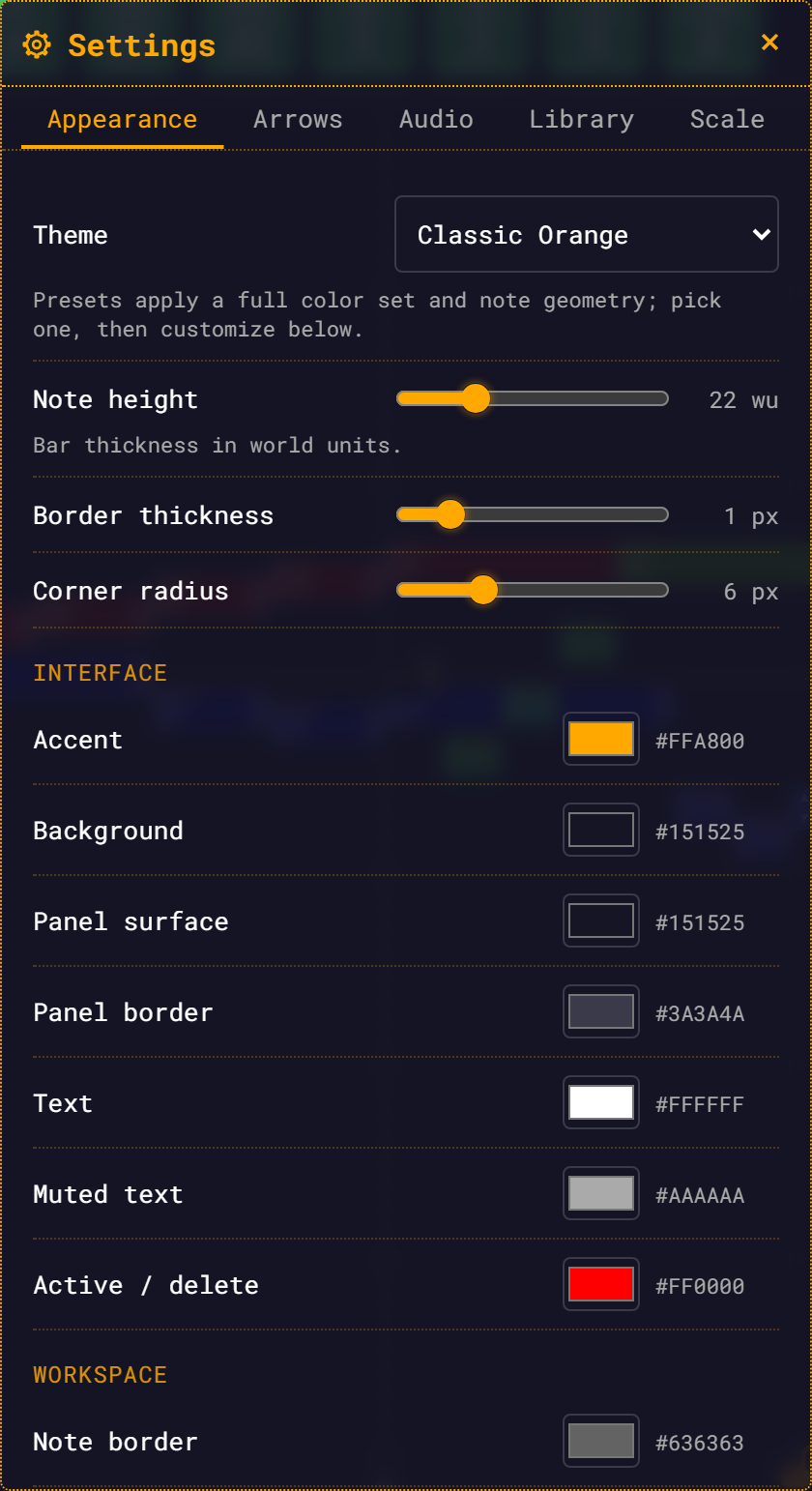
| Control | Type | Range | Default | Hint shown |
|---|---|---|---|---|
| Theme | dropdown | 4 presets | Classic Orange | "Presets apply a full color set and note geometry; pick one, then customize below." |
| Note height | slider, N wu | 8 – 60, step 1 | 22 wu | "Bar thickness in world units." |
| Border thickness | slider, N px | 0 – 6, step 0.5 | 1 px | — |
| Corner radius | slider, N px | 0 – 20, step 1 | 6 px | — |
| Reset colors to theme | button | — | — | Disabled while you have no overrides |
Then fifteen color pickers (a native swatch plus an uppercase hex readout), in three groups.
Choosing a preset discards your color overrides — and re-seeds the geometry sliders
The theme dropdown clears appearance.overrides before it applies the preset, with no confirmation, and writes the preset's declared note geometry into appearance.note — picking High Contrast lands border 2 px / corner 4 px, overwriting whatever the sliders held. Only the Reset colors to theme button asks first (and it, unlike the dropdown, leaves geometry alone).
Theme tokens
The fifteen tokens with a picker, and their value in each preset:
| Group | Picker label | Token | Classic Orange | Slate Cyan | Mono Light | High Contrast |
|---|---|---|---|---|---|---|
| Interface | Accent | accent | #ffa800 | #38bdf8 | #d17400 | #ffd400 |
| Interface | Background | bg | #151525 | #0b1120 | #f5f5f0 | #000000 |
| Interface | Panel surface | surface | #151525 | #111a2e | #ffffff | #0a0a0a |
| Interface | Panel border | surfaceBorder | #3a3a4a | #26334d | #cfcfc7 | #ffffff |
| Interface | Text | textPrimary | #ffffff | #e6f0ff | #1a1a1a | #ffffff |
| Interface | Muted text | textSecondary | #aaaaaa | #8fa3c0 | #666660 | #dddddd |
| Interface | Active / delete | danger | #ff0000 | #f43f5e | #c62828 | #ff2d2d |
| Workspace | Note border | noteBorder | #636363 | #5a6a85 | #9a9a92 | #ffffff |
| Workspace | Playhead | playhead | #ffa800 | #38bdf8 | #d17400 | #ffd400 |
| Workspace | Measure bars | measureBar | #ffffff | #cbd5e1 | #333333 | #ffffff |
| Workspace | Selection ring | selectionRing | #ffffff | #38bdf8 | #d17400 | #ffd400 |
| Workspace | Hover ring | hoverRing | #ffffff | #cbd5e1 | #333333 | #ffffff |
| Dependency highlights | Frequency | depFrequency | #ff8000 | #fb923c | #e06600 | #ff8000 |
| Dependency highlights | Start time | depStartTime | #00ffff | #22d3ee | #0088aa | #00ffff |
| Dependency highlights | Duration | depDuration | #9d00ff | #a78bfa | #7a2fd0 | #c46bff |
Each token is also published as a CSS custom property on <html>: --rmt-accent, --rmt-bg, --rmt-surface, --rmt-surface-border, --rmt-text-primary, --rmt-text-secondary, --rmt-danger, --rmt-note-border, --rmt-playhead, --rmt-measure-bar, --rmt-selection-ring, --rmt-hover-ring, --rmt-dep-frequency, --rmt-dep-start-time, --rmt-dep-duration, plus --rmt-accent-text, --rmt-note-default-saturation, and the RGB triplets --rmt-accent-rgb, --rmt-bg-rgb, --rmt-surface-rgb, --rmt-danger-rgb for rgba(var(--x), α) forms — --rmt-surface-rgb is what drives every 0.88-alpha panel background.
Every preset also carries three values with no picker: accentText, noteDefaultSaturation and newNoteColorMode. noteDefaultSaturation is consumed — published as --rmt-note-default-saturation, it sets the saturation of the random colour a new note gets — but you can only change it by picking a different preset. accentText and newNoteColorMode are declared and read by nothing.
What each workspace picker reaches:
- Selection ring colours the ring around a selected note, the selection wash, the group (multi-select) ring, and the outline of a selected BaseNote or measure triangle. The rubber-band marquee rectangle follows the Accent picker, not this one.
- Hover ring colours the hover ring on notes, the BaseNote and measure triangles.
- Frequency / Start time / Duration (Dependency highlights) colour both the dependency rings and the dependency link lines.
- Text (
textPrimary) also recolours all on-note glyph text — fraction labels, the word "silence", the octave arrows, and the BaseNote fraction. - Panel surface drives the translucent panel backgrounds via
rgba(var(--rmt-surface-rgb), 0.88).
Selecting a preset also applies its declared note geometry, re-seeding the three sliders — High Contrast lands border 2 px / corner 4 px. The sliders remain the way to fine-tune afterwards, and Reset colors to theme never touches geometry.
Arrows
| Control | Type | Range / options | Default | Hint shown |
|---|---|---|---|---|
| Show note arrows | checkbox | — | on | "Turn the ▲/▼ interval arrows on notes off entirely." |
| Arrow mode | dropdown | Reciprocal (up ×r, down ÷r), Independent up/down | Reciprocal | — |
| Up interval (ratio) | two number fields n / d + a live cents readout | positive integers; 1/16 ≤ n/d ≤ 16; ≠ 1 | 2 / 1 (1200.0¢) | "Down applies the reciprocal in reciprocal mode." |
| Quick pick | six chips | see below | — | — |
Quick-pick chips and the cents they show:
| Chip | Ratio | Cents |
|---|---|---|
Octave 2/1 | 2/1 | 1200.0¢ |
Fifth 3/2 | 3/2 | 702.0¢ |
Fourth 4/3 | 4/3 | 498.0¢ |
Major 3rd 5/4 | 5/4 | 386.3¢ |
Whole tone 9/8 | 9/8 | 203.9¢ |
Syntonic comma 81/80 | 81/80 | 21.5¢ |
Rules:
- In reciprocal mode,
arrows.downis re-derived asd/non every write ofarrows.up. Set up to3/2and down becomes2/3. - An invalid ratio heals to your previous value, per field: a bad numerator or denominator restores just that field from the ratio you had, while a wholly out-of-range ratio (
17/1,1/20) or one equal to 1 (3/3) reverts wholesale. Only a corrupt store loaded fresh — with no previous value to heal from — falls back to the default2/1. The number fields carry aminof 1 but nomax, so the browser lets you type 100; the store is what corrects it, and it visibly rewrites the fields with the healed value. - Nothing forbids an "up" ratio below 1. Set
arrows.upto1/2and ▲ transposes downward. - Unchecking Show note arrows dims the ratio editor and the chips but leaves them editable. The values take effect when you switch arrows back on.
In Independent up/down mode a Down interval (ratio) row renders below the up editor — the same two number fields and live cents readout, hinted "Only used in independent mode". (It is hidden in reciprocal mode, where down auto-derives.)
Audio
| Control | Type | Range | Default | Hint shown |
|---|---|---|---|---|
| Master volume | slider, % | 0 – 1, step 0.01 | 100% | — |
| Default instrument | dropdown | nine names | sine-wave | — |
| Room / Reverb | ||||
| Enable reverb | checkbox | — | on | "Adds spatial ambience to the output." |
| Room size | slider | 0 – 1, step 0.01 | 0.5 | — |
| Decay | slider, N.N s | 0.1 – 12, step 0.1 | 1.8 s | — |
| Damping | slider | 0 – 1, step 0.01 | 0.5 | — |
| Pre-delay | slider, N ms | 0 – 200, step 1 | 20 ms | — |
| Reverb amount | slider, % | 0 – 1, step 0.01 | 25% | "How much reverb is mixed in on top of the dry signal (0% = dry, 100% = fully wet)." |
| Stereo width | ||||
| Spread notes by pitch | checkbox | — | off | "Places low notes toward the left speaker and high notes toward the right, as if seated at the instrument. Off = centered (mono-position)." |
| Amount | slider, % | 0 – 1, step 0.01 | 60% | — |
| Master | ||||
| Limiter | checkbox | — | on | "Gentle output limiting to avoid clipping." |
The tab's footer reads: "Reverb, stereo and the limiter apply live during playback."
Instrument names
sine-wave, square-wave, sawtooth-wave, triangle-wave, organ, vibraphone, fm-epiano, piano, violin.
audio.defaultInstrument is the fallback, not an override: a note uses it only when neither it nor anything up its frequency chain pins an instrument. See instrument inheritance.
Behaviour worth knowing
- Master volume is two-way bound to the transport volume slider in the top bar. Dragging either moves the other. The transport slider only persists on release; while you drag it, it emits a live echo the panel follows.
- Room size, Decay and Damping re-render the reverb impulse response, debounced by 250 ms. Reverb amount, pre-delay and the enable toggle are live parameters.
- Stereo width is applied when a note is scheduled, so it changes newly-started voices, not ones already sounding.
- The limiter is a peak catcher: −6 dB threshold, knee 6, ratio 12, attack 0.003 s, release 0.25 s.
Library
| Control | Type | Range | Default | Hint shown |
|---|---|---|---|---|
| Icon size | slider, N px | 32 – 96, step 4 | 56 px | — |
| Show cents | checkbox | — | on | "Display cents alongside ratios in the module library." |
Both apply live to the module bar.
library.layoutVersion is stored and validated but has no control and no consumer. It is not a user setting.
Scale
This tab and the small accent dot at the bottom-left of the screen are two views of the same two numbers. Touch either and the other follows.
| Control | Type | Range | Default | Hint shown |
|---|---|---|---|---|
| Horizontal (time) | slider + editable number | spans the horizontal limits | 1 | "How far apart notes sit along the time axis." |
| Vertical (pitch) | slider + editable number | spans the vertical limits | 1 | "How far apart octaves sit along the frequency axis." |
| Slider limits | ||||
| Horizontal range | two number boxes, min – max | each 0.001 – 1000 | 0.3 – 2 | — |
| Vertical range | two number boxes, min – max | each 0.001 – 1000 | 0.3 – 5 | — |
Rules:
- Scale persists across reloads. You come back at the density you left.
- The number box is how you land on an exact value. It clamps into the current limits — widen the limits first to go further.
- The slider's detent is derived from its range: about a fiftieth of the span, snapped to a 1/2/5 ladder. At the default limits that is 0.02 horizontally and 0.1 vertically — both keep exactly 1.0 reachable by dragging.
- Editing the limits retunes both this tab's sliders and the bottom-left widget's sliders, live.
- If you type a
minthat is not below themax, the field you just edited wins and the other gives way by a factor of ten, rather than the edit being rejected. - Narrowing the limits pulls an out-of-range scale value back in with them.
Resets
Every tab ends with two buttons, at the bottom of its scroll flow.
| Button | Resets | Confirm button |
|---|---|---|
| Reset this tab | the section of the same name as the tab | Yes, Reset Tab |
| Reset all | all five sections | Yes, Reset All |
| Reset colors to theme (Appearance only) | appearance.overrides only — geometry is untouched | Yes, Reset Colors |
All three ask first. The confirmation dialog focuses Cancel, and is dismissed by Cancel, by Escape, or by clicking outside it.
Settings changes are not undoable — the app's Undo/Redo covers the module, not the settings. A reset is the only way back.
The stored envelope
Everything lives in one localStorage key.
| Key | rmt:settings:v1 |
| Schema version | 1 |
| Scope | per browser origin |
{
  "version": 1,
  "appearance": {
    "themeId": "classic-orange",
    "overrides": {},
    "note": { "heightWU": 22, "borderPxAtZoom1": 1, "roundedCornerPxAtZoom1": 6 }
  },
  "arrows": {
    "enabled": true,
    "mode": "reciprocal",
    "up":   { "n": 2, "d": 1, "label": null },
    "down": { "n": 1, "d": 2, "label": null }
  },
  "audio": {
    "masterVolume": 1,
    "defaultInstrument": "sine-wave",
    "reverb": { "enabled": true, "roomSize": 0.5, "decaySec": 1.8, "damping": 0.5, "preDelayMs": 20, "wet": 0.25 },
    "stereo": { "enabled": false, "width": 0.6 },
    "limiter": { "enabled": true }
  },
  "library": { "iconSizePx": 56, "showCents": true, "layoutVersion": 2 },
  "scale": {
    "x": 1,
    "y": 1,
    "limits": { "xMin": 0.3, "xMax": 2, "yMin": 0.3, "yMax": 5 }
  }
}Paths are dot-delimited: arrows.up, audio.reverb.wet, appearance.themeId, scale.limits.
How a bad value is handled
The whole tree is re-validated on every single write, then persisted. That is what keeps derived invariants (the reciprocal down) true and what makes a hand-edited storage entry safe. validateSettings(raw, prev) takes an optional second parameter — the pre-edit tree — and the store passes it on every set/setSection, which is what lets an invalid arrow ratio heal to the value you previously had instead of a schema default. Load and migrate paths pass no prev. The envelope, key and version are unchanged.
| Situation | Result |
|---|---|
| Key missing | Defaults |
| Corrupt JSON | Warn to the console, then defaults |
| A number out of range | Clamped into range |
| A field of the wrong type | Replaced by its default |
| An invalid arrow ratio | Healed to your previous ratio (per-field); only a fresh load with nothing to heal from falls back to 2/1 |
An inverted scale range (min ≥ max) | That axis's limits fall back to their defaults wholesale |
| Scale limits narrowed around a far-off value | The limits are validated first, then the value is clamped into them |
localStorage full, or private mode | Non-fatal: settings work for the session but are not saved |
There is no migration code. v1 is the first and only version — the versioned envelope is scaffolding for a future one. Partial or corrupt stored settings are healed by validation, not by migration.
What is not a setting
- No import/export of settings, no settings file, no cloud or account sync.
- No per-module settings — settings belong to the browser, not to the composition.
- No undo for a settings change.
- No OS light/dark detection.
mono-lightis a preset you pick by hand; there is noprefers-color-schemehandling. - No custom named themes. Four presets plus a flat override map is the whole story.
- The panel's position is not persisted across reloads (it does survive close → reopen).
- The instrument dropdown is a fixed list. A newly registered instrument would not appear in it automatically.