Complex Dependencies
A note's startTime, duration and frequency are three independent expressions. They can point at three different notes. Once you internalise that, most "complex" structures are just bookkeeping.
Prerequisites: Note Dependencies.
One note, three parents
Note 3 takes its pitch from note 1 and its timing from note 2:
frequency: [1].f * (5/4)
startTime: [2].t
duration: [2].dLegacy JavaScript syntax
frequency: module.getNoteById(1).getVariable('frequency').mul(new Fraction(5, 4))
startTime: module.getNoteById(2).getVariable('startTime')
duration: module.getNoteById(2).getVariable('duration')Harmony that follows a melody
| Note | Role | frequency | startTime | duration |
|---|---|---|---|---|
| 1 | Melody | base.f * (3/2) | base.t | beat(base) |
| 2 | Harmony | [1].f * (5/4) | [1].t | [1].d |
| 3 | Bass | [1].f / 2 | [1].t | [1].d |
Move note 1, and 2 and 3 move with it. Retune note 1, and they retune with it, keeping their intervals. Nothing about notes 2 and 3 needed editing — that is the whole point.
Branching
One note feeding several children:
        Note 1
       /   |   \
Note 2 Note 3 Note 4| Note | frequency | startTime | duration |
|---|---|---|---|
| 1 | base.f | base.t | beat(base) * 4 |
| 2 | [1].f * (3/2) | [1].t | beat(base) * 2 |
| 3 | [1].f * (5/4) | [1].t + beat(base) * 2 | beat(base) * 2 |
| 4 | [1].f * 2 | [1].t | beat(base) * 4 |
Diamonds
Two notes share an ancestor; a third depends on both.
      base
      /    \
  Note 1   Note 2
      \    /
Note 3| Note | frequency | startTime | duration |
|---|---|---|---|
| 1 | base.f * (3/2) | base.t | beat(base) * 2 |
| 2 | base.f * (5/4) | [1].t + [1].d | beat(base) * 2 |
| 3 | [2].f * (3/2) | [1].t + [1].d | beat(base) * 2 |
Note 3 gets its pitch from note 2 and its start from note 1. Both routes lead back to the BaseNote, so a change to base.f reaches note 3 twice — and the evaluator still visits each note exactly once, in topological order.
Reading the dependency lines
Select a note. Lines appear connecting it to its relatives, coloured by which property the relationship is in:
| Colour | Property |
|---|---|
| Orange | frequency |
| Teal | startTime |
| Purple | duration |
| Weight | Direction |
|---|---|
| Thick | what this note depends on (its parents) |
| Thin | what depends on this note (its children) |
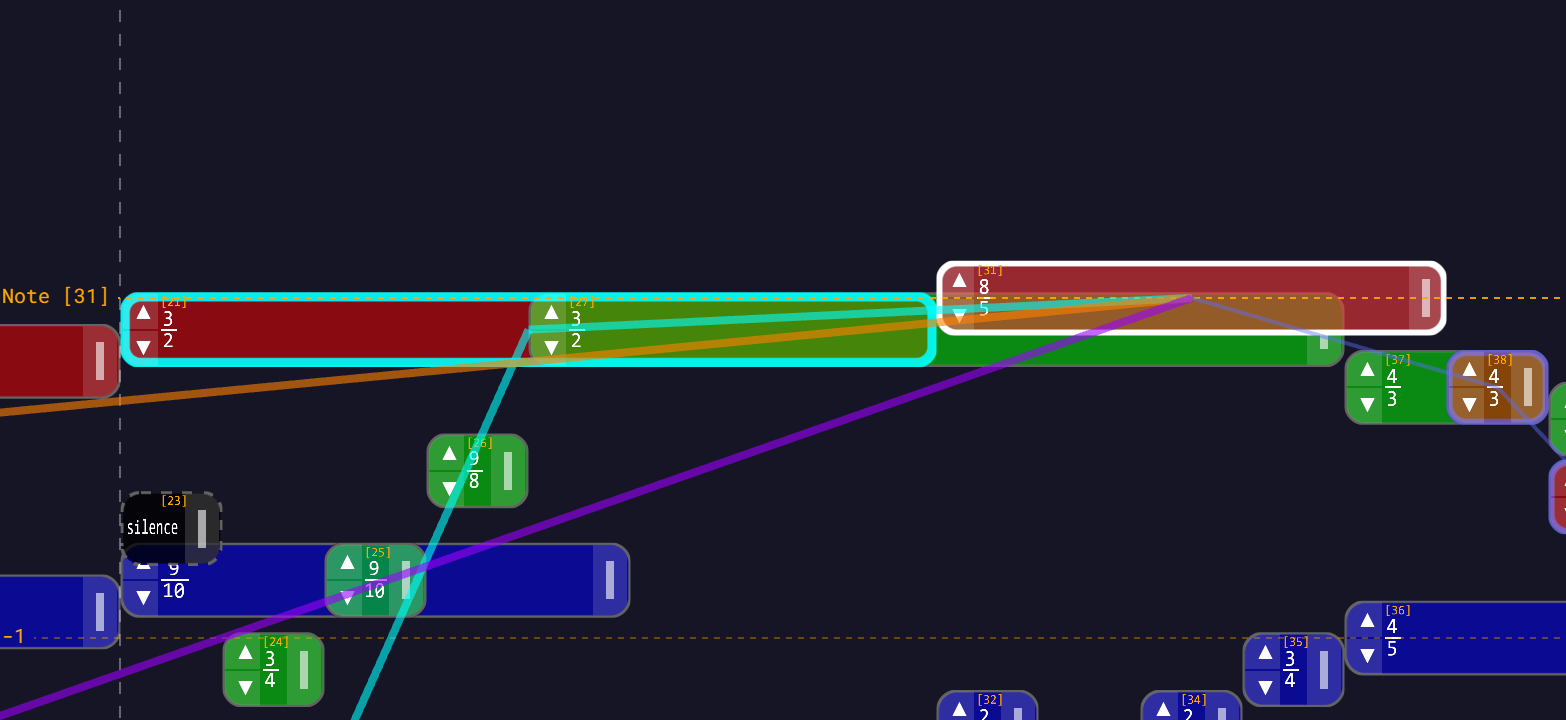
The lines only show while a note is selected. During a drag, the properties that aren't being changed dim to a faint 15% — so while you move a note horizontally, teal (startTime) stays bright and orange and purple recede. That is the app telling you which relationships your gesture is actually about.
Cascading changes
Take the diamond above and change base.f from 263 to 330. Every note downstream re-evaluates:
- note 1 =
base.f * (3/2)→ 495 Hz - note 2 =
base.f * (5/4)→ 412.5 Hz - note 3 =
[2].f * (3/2)→ 618.75 Hz
Note 3 never mentions base.f, but it moved anyway — it reaches the BaseNote through note 2.
Only notes that actually depend on what changed are recalculated. The graph keeps an inverse index for exactly this, so a wide tree (a hundred notes all hanging off the BaseNote) is cheap — it is one lookup, not a hundred searches.
Edits apply on save
Typing in a Raw: field changes nothing. The Save button appears next to the field as soon as you start typing; the value updates when you press it. If the expression is invalid, the save is rejected and the reason appears in red under the Save button.
Tempo is a BaseNote property
There is no per-note tempo control
The note widget exposes exactly four variables for a regular note — startTime, duration, frequency, color — plus an instrument selector. There is no tempo field. Tempo is editable on the BaseNote only. You cannot build a section that runs at a different tempo from within the app.
The module file format does accept a tempo key on a note, and beat([N]) does read it — but measure([N]) does not pick up a regular note's tempo, and nothing in the UI will ever write one. Treat per-note tempo as unreachable, and change tempo on the BaseNote.
What you can vary is beatsPerMeasure per measure: select a measure bar (the dashed vertical lines) and use its Measure Duration row. See Working with Measures.
Relative timing patterns
Call and response
| Note | startTime | duration |
|---|---|---|
| 1 (call) | base.t | beat(base) * 2 |
| 2 (response) | [1].t + [1].d + beat(base) * (1/2) | [1].d |
Note 2 starts half a beat after note 1 ends and lasts exactly as long. Lengthen note 1 by dragging its right edge and note 2 slides and stretches to match.
Echo
| Note | frequency | startTime | duration |
|---|---|---|---|
| 1 | base.f | base.t | beat(base) |
| 2 | [1].f | [1].t + beat(base) * (1/4) | [1].d |
| 3 | [1].f | [1].t + beat(base) * (1/2) | [1].d |
There is no per-note volume
You cannot fade an echo out — note volume is not a property. What you can vary per note is the instrument: the note widget has an instrument selector, and a note with no explicit instrument inherits one up its frequency chain. Giving the echoes a quieter timbre (sine-wave against an organ original) is the closest available approximation.
Parallel voice leading
| Voice | frequency | startTime | duration |
|---|---|---|---|
| 1 Soprano | base.f * 2 | base.t | beat(base) |
| 2 Alto | [1].f * (4/5) | [1].t | [1].d |
| 3 Tenor | [1].f * (2/3) | [1].t | [1].d |
| 4 Bass | [1].f / 2 | [1].t | [1].d |
Every voice is defined against the soprano. Move the soprano and the block moves in parallel, intervals intact.
Stepwise sequence
There is no loop construct and no variables in the expression language — each note names a concrete id. A five-note ascending sequence in whole tones:
| Note | frequency | startTime |
|---|---|---|
| 1 | base.f | base.t |
| 2 | [1].f * (9/8) | [1].t + [1].d |
| 3 | [2].f * (9/8) | [2].t + [2].d |
| 4 | [3].f * (9/8) | [3].t + [3].d |
| 5 | [4].f * (9/8) | [4].t + [4].d |
Each note steps up from the previous one, so retuning note 1 shifts the whole run. This is the same shape the shipped Scale Systems modules use.
Editing a whole structure at once
Once a structure is more than a handful of notes, edit it as a set.
Build a selection. Shift-drag a marquee across empty background on desktop; long-press empty space and drag on touch. Shift-click (desktop) or long-press (touch) individual notes to toggle them in or out. Selected notes get a heavy selection ring and a group widget appears.
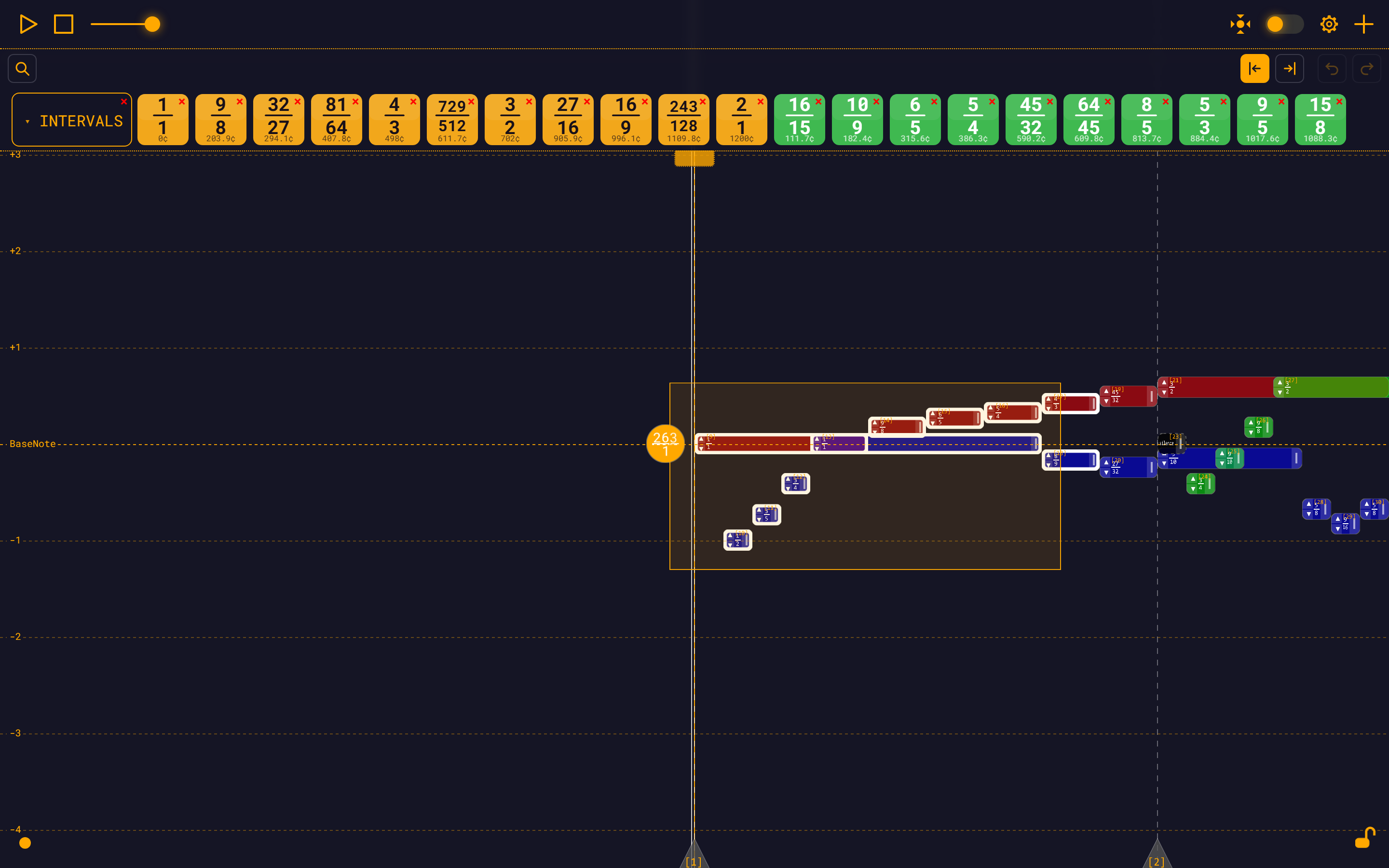
Drag the group. Dragging any selected note moves the whole set in time, as one undo entry. Crucially, relationships are preserved: if note 2 is [1].t + [1].d and you drag both, note 2's expression is not rewritten — it just follows note 1 for free. Only "root" notes of the selection (those whose timing anchor lies outside the set) get re-anchored.
Notes outside the selection that depend on a moved note still follow it. That is deliberate, and it is the same rule as a single-note drag.
What is not a group operation
Resizing, the ▲/▼ arrows, and the note widget all act on one note. Only the note-body drag is group-aware. There is no group transpose, no group resize, no group colour change.
Breaking a chain
Two escape hatches, both in the note widget's EVALUATE section. They cut the chain in opposite directions, and picking the wrong one is the classic mistake:
Liberate Dependencies — frees the note's children. Every note that referenced the selected note has that reference replaced by the selected note's own raw expressions. The dependents keep their exact pitches, positions and lengths, but they no longer point here. The selected note itself is untouched. Use it before you delete or radically rewrite a note, so its dependents do not follow it.
Evaluate to BaseNote — frees the note itself. It rewrites the selected note's own startTime, duration and frequency so they reference nothing but the BaseNote. The note does not move; it just stops depending on its parents.
So: Liberate looks downstream, Evaluate to BaseNote looks upstream. Reach for them instead of hand-editing every expression. Full walkthrough in Note Dependencies.
Group delete liberates, it does not cascade
Press Delete all in the group widget and you get a confirmation, then: the selected notes are removed, and every note outside the group that referenced them is liberated, not deleted. Their expressions are inlined, so they keep their exact positions, lengths and pitches. A direct dependent that had no explicit instrument also inherits the deleted note's instrument.
The confirmation text says "irreversible". It is not — the whole delete is one undo entry, and Ctrl+Z brings it back.
Cycles
An expression cannot reference itself, and a chain cannot close on itself. The validator catches both before the edit lands:
Expression cannot reference itself directlyCircular dependency detected in expression
These messages reach the browser console, not the screen. If a save appears to do nothing, open the console — that is where the reason is.
If a cycle does somehow get into the graph (via a hand-edited JSON file), the evaluator logs Dependency cycle detected! Some notes could not be evaluated. and evaluates the stuck notes anyway rather than dropping them.
Debugging
Trace the chain. Select the last note. Follow the thick lines — orange for pitch, teal for timing, purple for length — back to their source. Thick means "this is what I depend on."
Check the hatching. A crosshatched note produced an irrational value itself; a single-diagonal note inherited one. See Understanding SymbolicPower.
Common mistakes:
| Symptom | Cause |
|---|---|
| Save does nothing | Invalid expression — check the console |
| Note jumps to 0 / 440 Hz | The referenced note id does not exist; the evaluator substitutes a default rather than failing |
| Wrong note moved | You referenced [2] when you meant [3] — ids are not stable across a Save Module (it reindexes) |
Value shows ≈ unexpectedly | Something upstream is irrational |
Note ids change when you save
Save Module reindexes the whole module in one run from 1 — measures first, then notes, each group sorted by start time. The ids in the downloaded file will generally not match the ids you were looking at. Expressions are rewritten to match, so the music is unchanged, but do not memorise ids across a save.
Next
- Building a Module Library — turn a structure into a reusable module
- Exploring Intervals — the 46 shipped ratios
- Dependency Graph — how the indexes work